


Unified compliance and forecasting for a stronger IT strategy

Zeffer gives IT directors secure, integrated tools to manage school systems, streamline data workflows, monitor compliance, and support accurate, auditable financial forecasting.
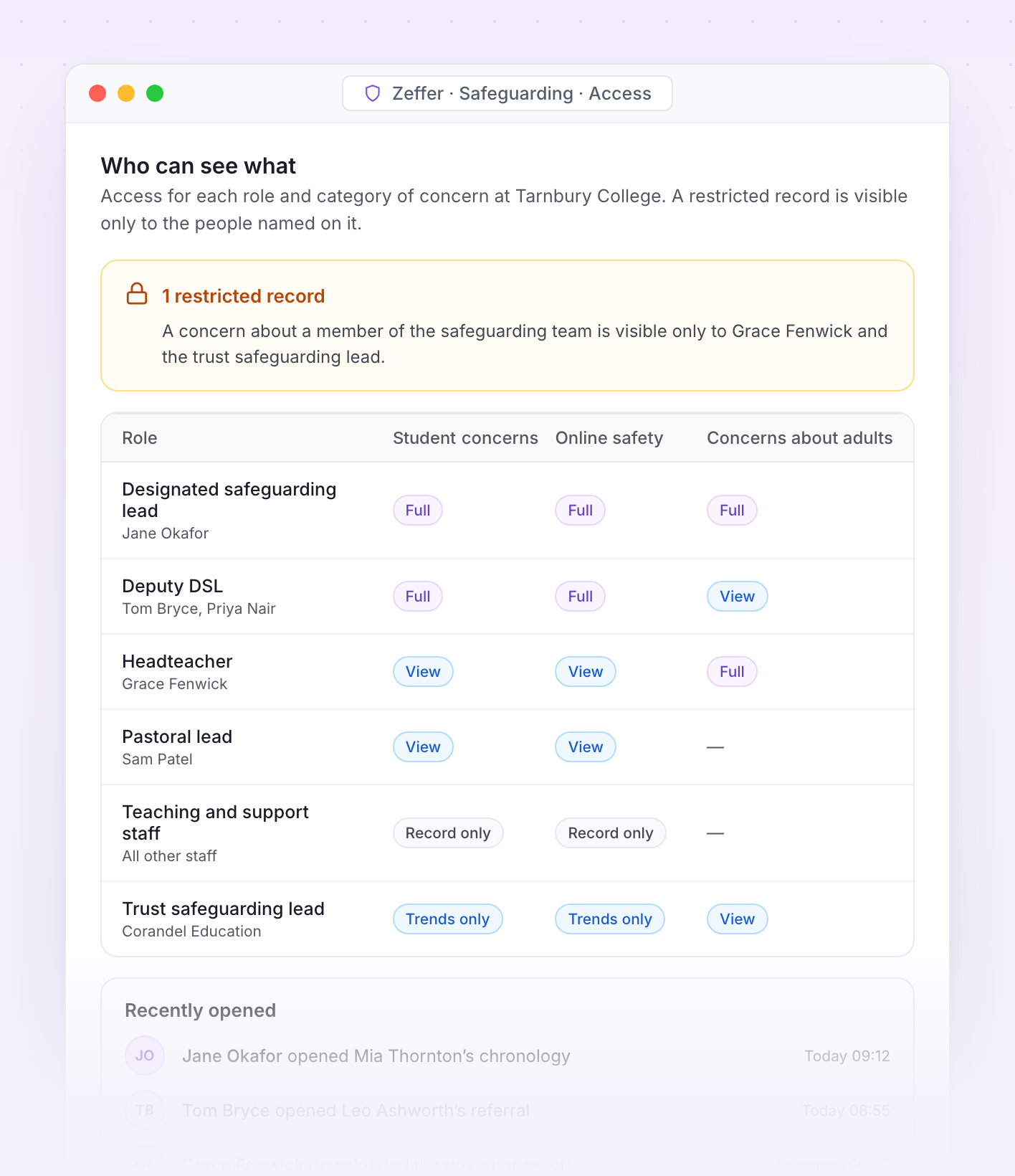
Access to each category of concern by role, with a restricted record

Access. Who can see each category of concern at Tarnbury College, and which records are restricted to named staff.

School-specific · Access and audit

The right people see the right concerns

Safeguarding information is shared on a need-to-know basis. Each school decides who can see each category of concern, and Zeffer records every view.
Who can see what

Set access per role at None, Record only, View or Full for each category of concern.
Restrict a single record to named staff, such as a concern about a member of the safeguarding team.
Staff who raise a concern can see it was received, without seeing the case.
Trust leads see trends across schools, not individual case files.

Every view recorded

Every entry, edit and view is time-, date- and user-stamped.
Nothing is deleted. Corrections are added as new entries with the reason.
See who has opened a child's file, and when, in one list.
Safeguarding roles and training come from Zeffer HR, so the team list is always current.
School-specific · People and posts

Staff roles that understand how schools work

Zeffer holds teaching, support, leadership, boarding and peripatetic posts in each school's departments, and lets one person hold more than one job. A post's role decides which checks its holder needs.

School structure

Posts by department, with a staff category, a budgeted headcount, and flags for work with children and for management.
Departments for each school, with optional accounting codes.
Term calendars and bank holidays for each school's region.
For a group, every screen can be viewed for one school or the whole group.

The right access for each role

Set access per role at None, View, Edit or Full for each area of HR.
Four separate keys to sensitive data: personal, pay, health and safeguarding, never granted automatically.
Nobody approves their own request. Leave, claims, pay changes and references always go to someone else.
Full history of who changed what and when, on every HR record.
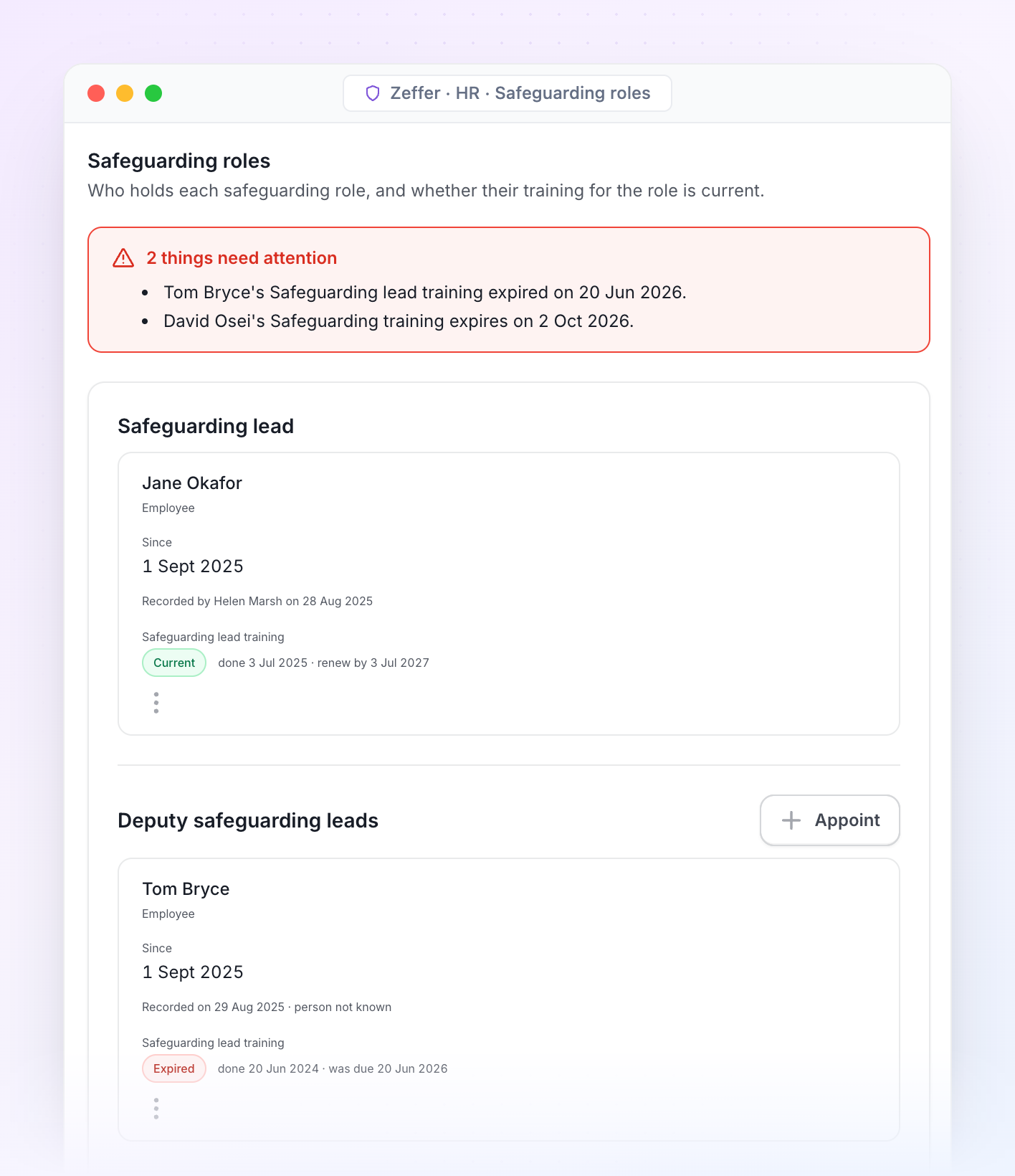
Safeguarding roles with training status for each holder
Safeguarding roles. Who holds the designated safeguarding lead, deputy and safeguarding governor roles in each school, and whether each holder's training is still current.
Explainable · Every figure

Every figure traces back to something someone entered

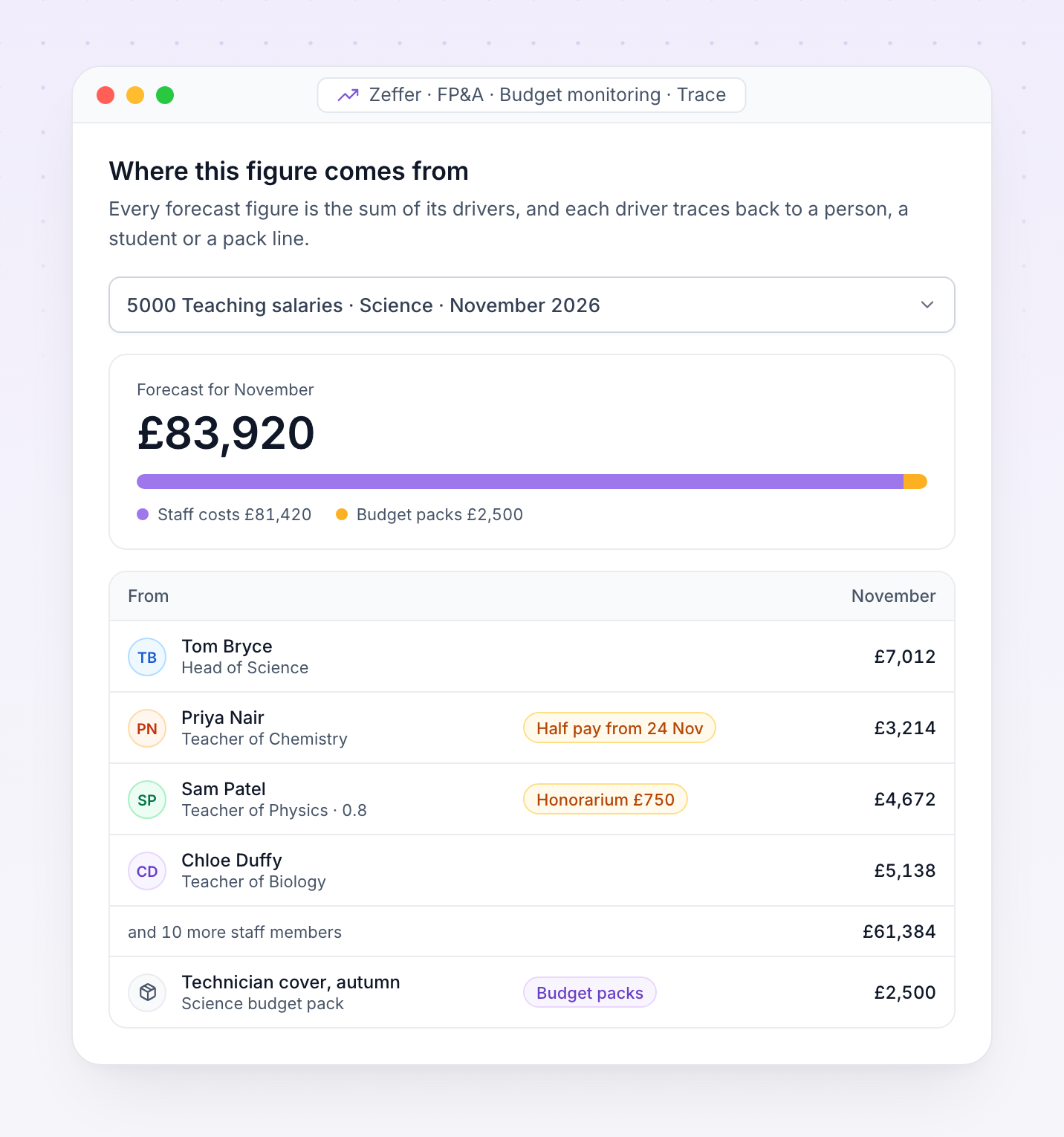
A forecast should be explainable. Open any figure in Zeffer to see the drivers it is made of, down to the member of staff, the student or the pack line behind it.
Accounting systems in Zeffer today
AccountsIQ
Sage 50
Sage Intacct
Each forecast figure is the sum of its drivers: staff costs, fee income, pack lines, capital, loans and leases.
A forecast keeps the assumptions it was built with. Newer data reaches it only when you refresh the drivers.
Once approved, the budget is locked. Later changes are amendments, and the gap to the forecast is the variance.
Nothing is posted to your books. Zeffer reads your actuals, and sends a budget file only when you ask.
One month's teaching salaries for Science broken down into staff costs by person and a budget pack line
Integrations

Actuals, students and staff arrive on their own

Zeffer connects to your accounting system, your MIS and Zeffer HR. Each month's trial balance replaces the forecast for the months that have closed, and student and staff changes reach the forecast as soon as you refresh it.

When the month closes

1

Finance closes the month in your accounting system.

2

Zeffer imports the trial balance for every school's nominals.

3

Actuals replace the forecast for the closed months.

4

Finance refreshes the drivers to take in new students, starters and amendments.

5

Management accounts and the bridge to budget are ready to present.
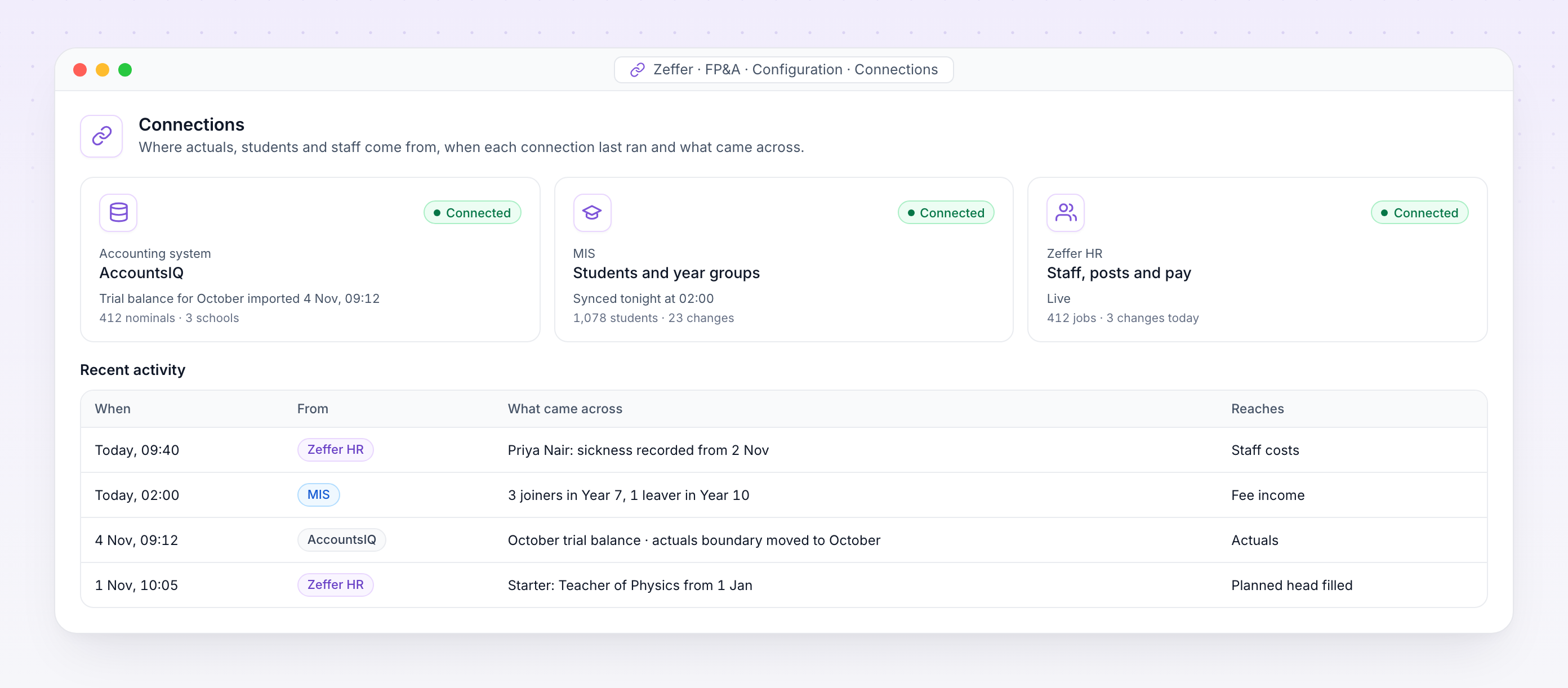
Accounting system, MIS and Zeffer HR connections with recent activity

Connections. Where actuals, students and staff come from, when each connection last ran and what came across.

Accounting system

Trial balances by nominal and analysis code from AccountsIQ, Sage 50 or Sage Intacct, for every school in the group.

MIS

Students by school, year group and boarding type, so fee income follows the roll.

Zeffer HR

Staff, posts, pay, absence and one-off payments, live from the HR record.

Integration iconIntegration iconIntegration iconIntegration iconIntegration iconIntegration icon
Integrations

Get more value from your tools

Connect your tools, connect your teams. With over 100 apps already available in our directory, your team’s favourite tools are just a click away.
Support

Frequently asked questions

FAQs outlining how IT directors interact with our software and collaborate with our company.
What role does IT play in supporting this system?
Its role is primarily governance rather than day-to-day operation. The system is designed to be managed by finance, with IT overseeing access controls, data security, integration standards, and vendor compliance. Ongoing technical involvement is minimal once implemented.
Does it integrate with our existing MIS and finance software?
Integration is intentionally lightweight. The system typically imports aggregated data (such as student numbers and cost totals) via secure spreadsheets or standard data exports from the MIS and finance system. No deep or real-time integration is required. API’s are built within the platform, however not required for forecasting and budgeting needs.
What data does the system store?
The system stores financial and planning data only. It does not require student-level or staff-level personal data, significantly reducing data protection and GDPR risk. All data is used for forecasting and scenario modelling rather than operational processing.
Where is the data hosted?
Data is hosted in reputable, secure data centres that comply with recognised security and compliance standards. Hosting details and certifications can be reviewed as part of vendor due diligence.
What is the impact on our existing infrastructure?
Minimal. Because the system is cloud-based and browser-accessible, there is no requirement for additional hardware, software installations, or local database management.
Is this a cloud-based or on-premise system?
The system is cloud-based, removing the need for local infrastructure, servers, or backups. This reduces maintenance overhead for IT and ensures users are always on the latest version without manual updates.
Does the system support auditability and change tracking?
Yes. Key assumptions and changes can be reviewed and tracked over time, supporting audit trails and enabling IT and finance to understand when and why forecasts were updated.
How is data security handled?
The platform uses industry-standard security measures, including encrypted data storage and secure user authentication. Access is role-based, allowing IT to control who can view or edit forecasts and assumptions.
How does user access and permissioning work?
The system supports role-based access. For example, finance users can edit assumptions, while senior leadership or governors may have read-only access. This aligns with good security and governance practice.
How is business continuity handled?
Zeffer provides system resilience, regular backups, and disaster recovery processes as part of the service. This reduces reliance on internal IT resources for continuity planning.
Avatar photoAvatar photoAvatar photo

Start your free trial

Can’t find the answer you’re looking for? Please contact our friendly team.