


Transparent finance and compliance for governors

Zeffer gives school governors real-time visibility, integrated financial and compliance data, and collaborative tools to make informed, confident decisions.
Reporting · Governance

Management accounts ready when the month closes

As soon as the month's trial balance arrives, the management accounts are ready: actuals to date, the forecast for the rest of the year and the budget beside them, for one school or the whole group.
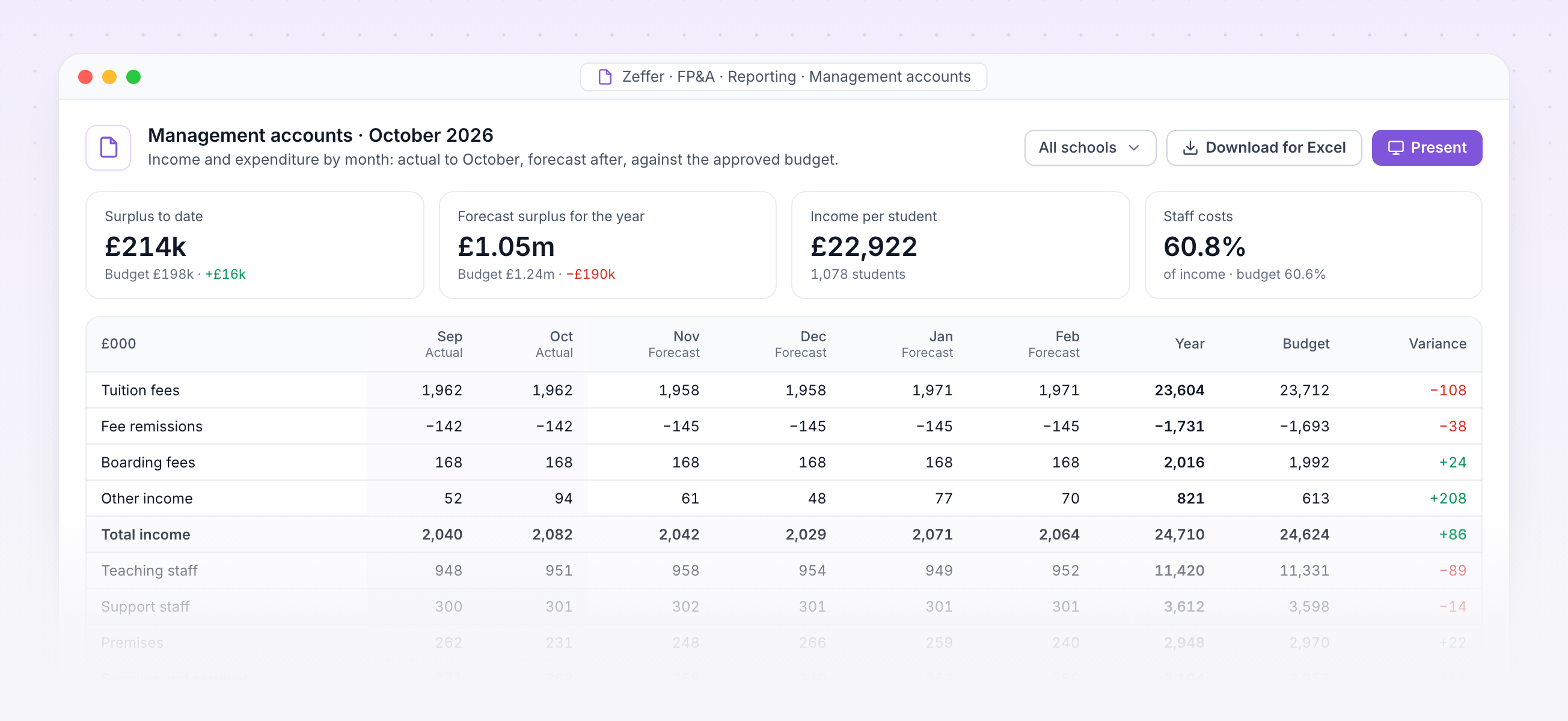
Arrange the lines, columns and periods your way, and add per-student figures.
Present full screen at the finance committee, or download for Excel exactly as shown.
Balance sheet and cashflow reports come from the same forecast.
Every figure traces back to a student, a member of staff or a pack line.
Management accounts with income and expenditure by month against the budget

Management accounts. October's income and expenditure by month, actual then forecast, against the approved budget.
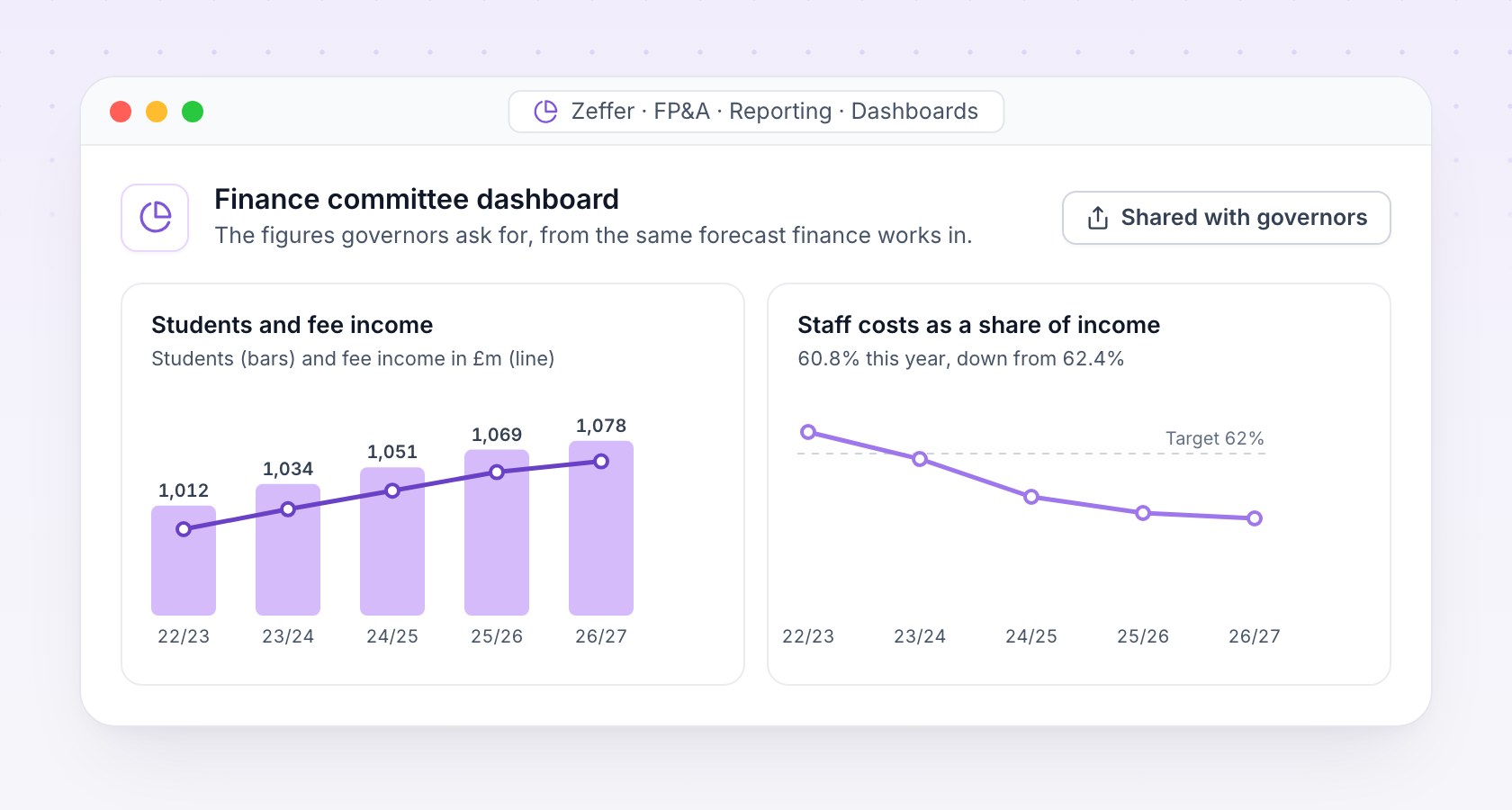
Finance committee dashboard with students, fee income and staff costs over five years
Dashboards

The figures governors ask for

Build dashboards for the finance committee and the board from the same forecast, and share them with exactly the people who should see them.

Students, fee income, staff costs and cash over time, by school or across the group.
Governors see the dashboards and plans shared with them, without access to the detail behind them.
Strategic · Scenarios

Plan five years ahead and test the what-ifs

A strategic forecast runs the year forward for as many years as you need, each opening on the last one's year end. Layer assumptions on a fixed starting point and compare scenarios side by side.

Scenarios

Model a new boarding house, a fee change or a different roll, each as its own forecast.

Stress tests

Push the assumptions to extremes, such as a 10% fall in the roll, and see where the plan breaks.

Pay awards and rates

Set the pay award, fee increases and inflation for each scenario's later years.

A new starting point

Move a scenario onto newer actuals or the approved budget, and keep its assumptions.

Joiners and leavers

Students and staff joining or leaving in-year, owned by the scenario, not the budget.

Shared with governors

Share a scenario with named governors, so the board sees the same plan as finance.
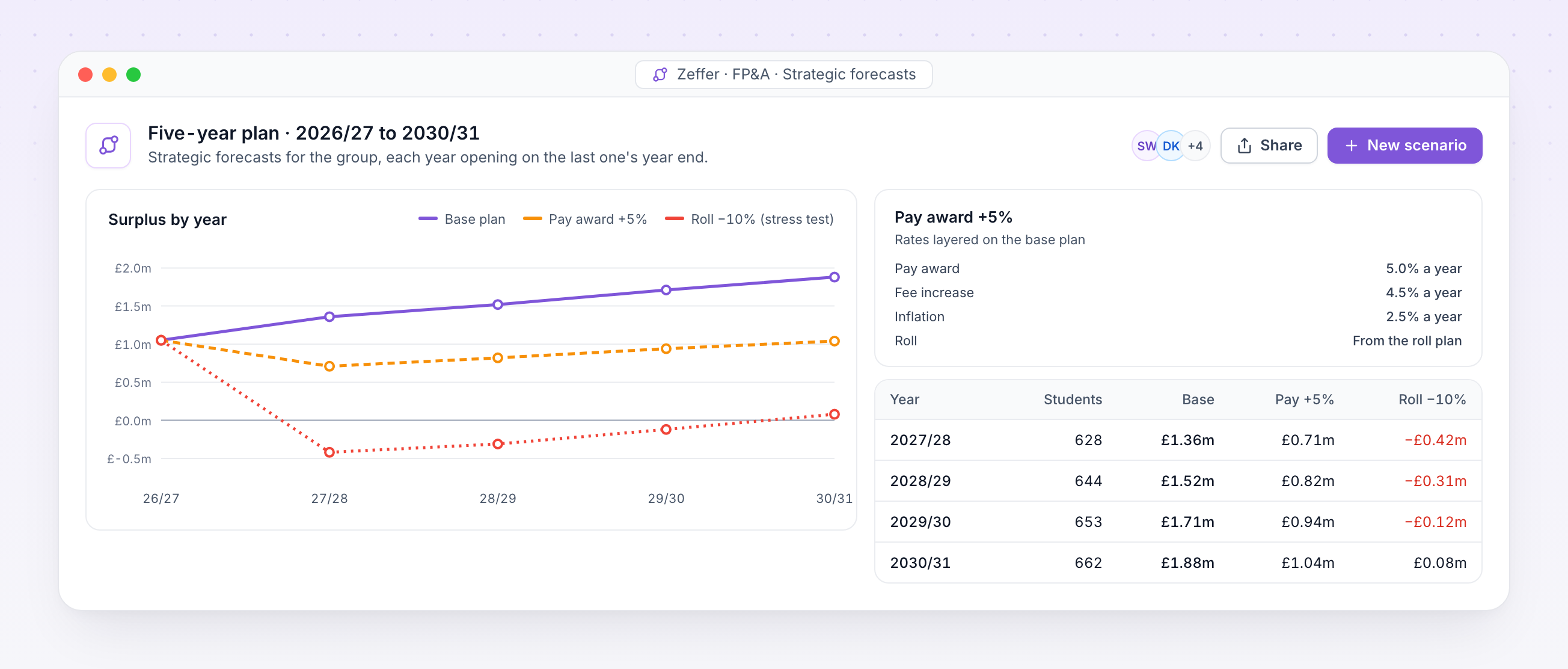
Five-year plan comparing surplus by year for a base plan, a pay award scenario and a roll stress test
School-specific · Inspection and governance

Ready for inspection, governors and the trust

Reports come from the same records the safeguarding team works in, so the numbers always agree. Produce the termly governor report, an inspection summary or a trust-wide view in minutes.
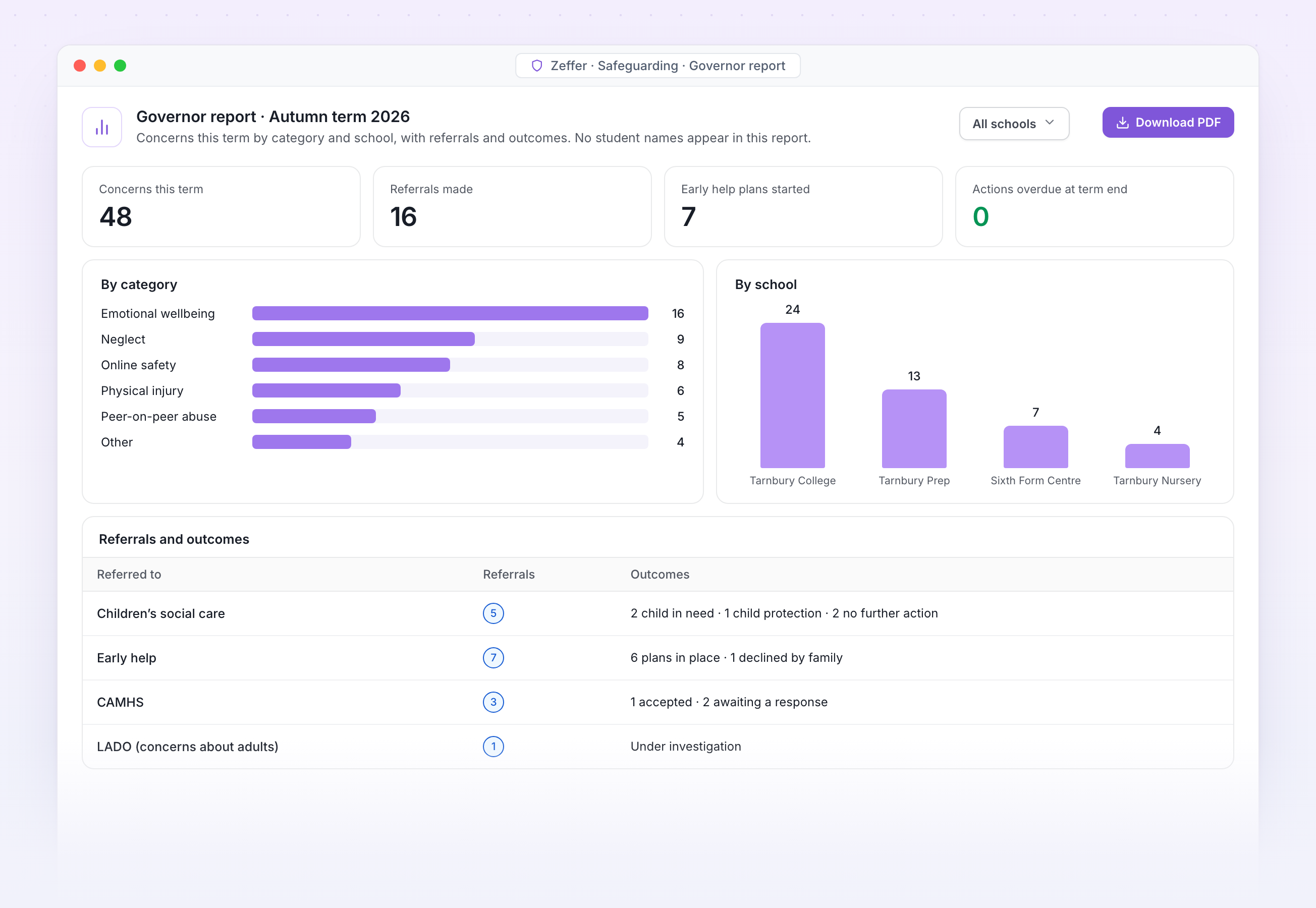
Termly governor report with concerns by category and school

Governor report. Concerns this term by category and school, with referrals and outcomes and no student names, ready for the safeguarding governor.

Trends over time

With filters for SEND, looked-after children and disadvantaged students.

Concerns by term
SEND filter on
AutSprSumAutSprSum
All students
SEND

Trust dashboards

Compare schools across the trust without showing individual students.

Open concerns by school
4 schools
Oakfield
42
Riverside
31
Hillcrest
24
St Anne's
18

Every download logged

Any report as a spreadsheet or PDF, with a record of who downloaded it.

Download log
Audited
JP
Governor report, autumn
J. Patel · DSL · 09:14
PDF
MO
Trends by year group
M. Okafor · Head · Yesterday
XLSX

Governor reports

Termly governor reports by category, year group, school and outcome.

Concerns by category
No student names
128
Neglect
34%
Emotional
26%
Online
18%
Other
22%

Inspection summary

An inspection summary for Ofsted, ISI or Estyn, as at any date.
Inspection summary
Ready
Concerns with outcomes
128
Referrals and responses
14
DSL training in date
100%
As at 11 Nov 2026 · Ofsted, ISI or Estyn
Register of low-level concerns and allegations about adults
Kept apart from student records

Staff allegations and low-level concerns

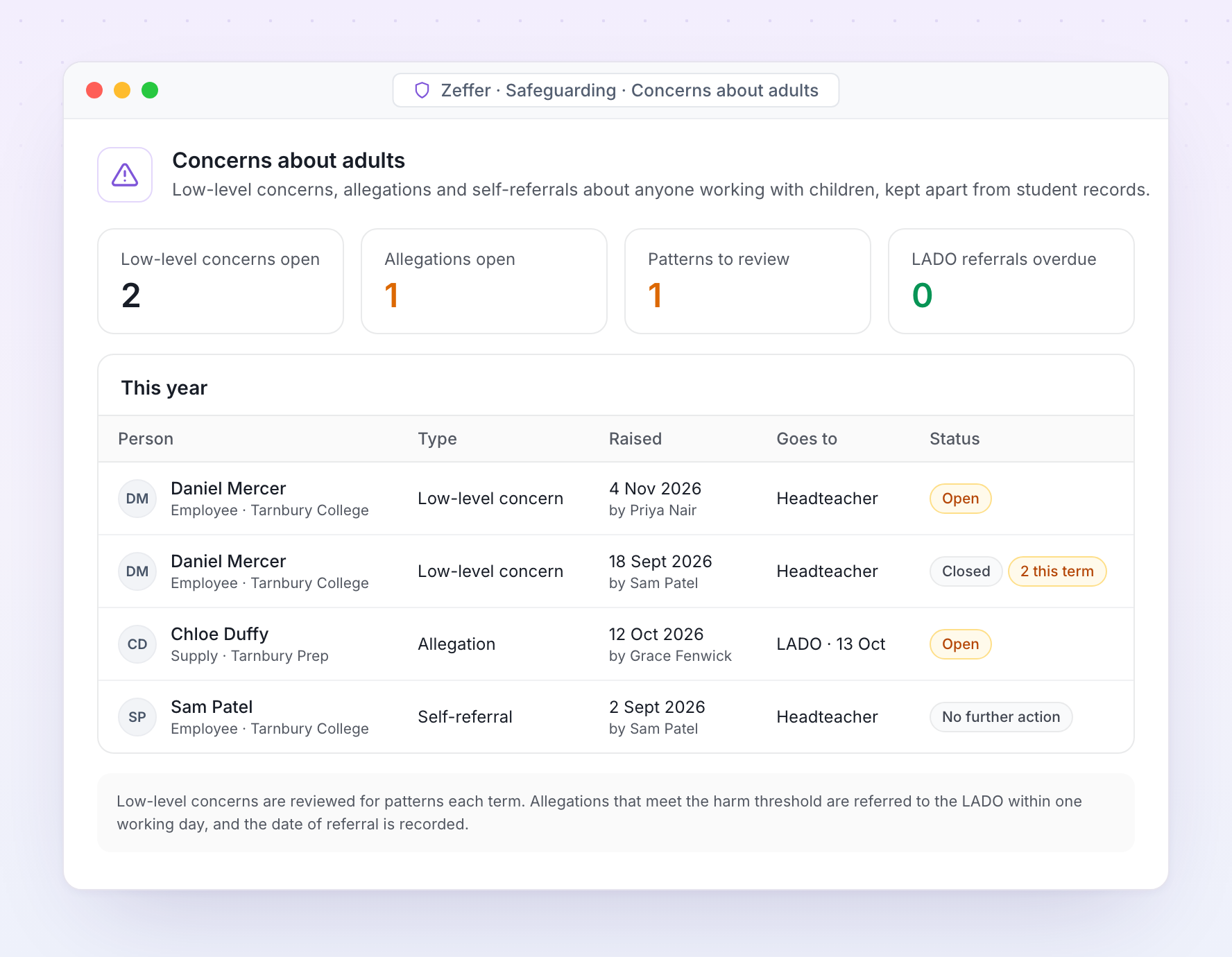
Concerns about adults are kept apart from student records, with their own access. Low-level concerns, allegations and self-referrals each follow the route KCSIE sets out.
Concerns about adults handled the way KCSIE expects
Low-level concerns are recorded and reviewed for patterns. Allegations that meet the harm threshold are referred to the LADO with the date recorded, and records are kept for as long as KCSIE requires.
School-specific · Inspection

Ready for inspection on any day

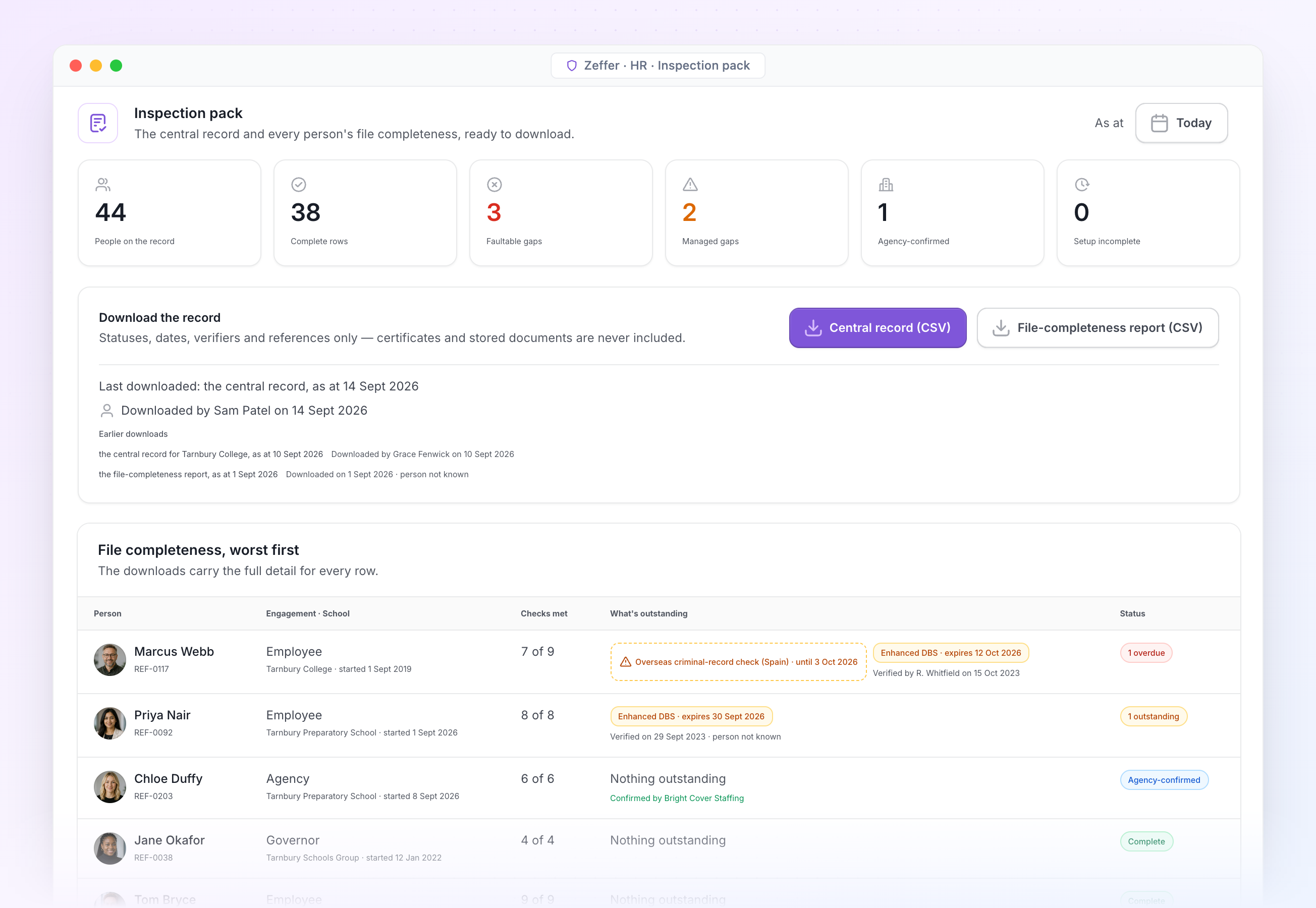
The inspection pack is the central record as at any date, with a file-completeness report for every person. Download it the morning the inspector calls, or the day before term starts.
Zeffer inspection pack with counts, downloads and a worst-first list
Inspection pack. Counts, downloads and a worst-first list of who still has something outstanding. Every download is logged.
Allegations register

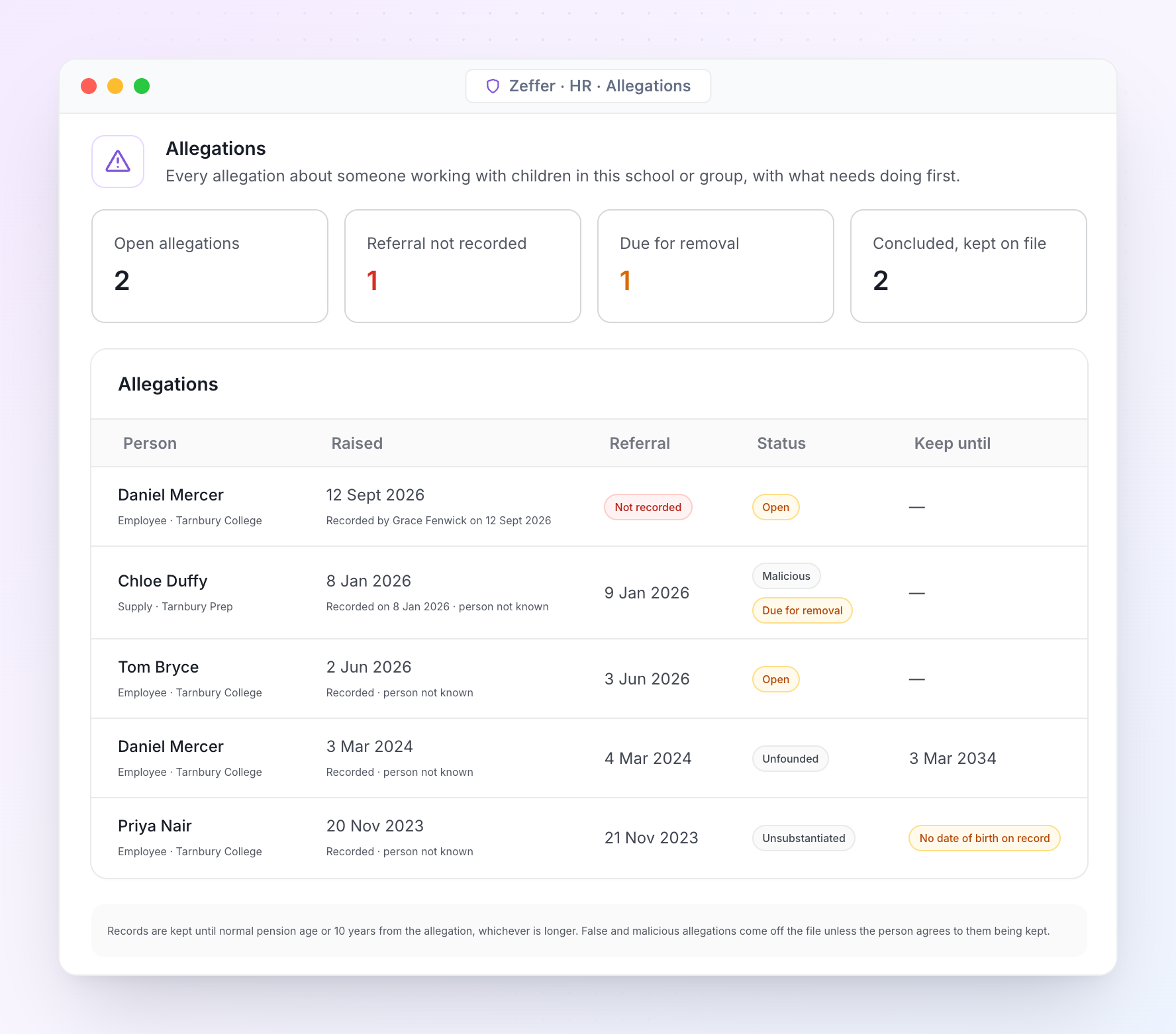
Allegations register

Every allegation about someone working with children, its referral to the designated officer, the outcome and how long it is kept. Only holders of the safeguarding key can open it.
Kept alongside the pack

Every register an inspector asks to see

The central record is only part of the evidence. The registers that sit around it live in Zeffer too, dated and signed off, so nothing has to be pulled together from spreadsheets on the day.
Central record and file-completeness report as spreadsheets, as at any date. Certificates and stored documents are never included.
Governance reviews and sign-offs by the safeguarding lead and the safeguarding governor, with dates and who took part.
Safer-recruitment training register: who is trained, who is lapsing and who may sit on a panel.
Risk-assessed gaps with their review dates, shown as managed in the pack.
Register of interests and the safeguarding roles register, kept alongside.
Allegations handled the way KCSIE expects
Referral to the designated officer is recorded with its date. Records are kept until normal pension age or ten years from the allegation, whichever is longer, and false or malicious allegations come off the file unless the person agrees to them being kept.
Support

Frequently asked questions

FAQs outlining how governors interact with our software and collaborate with our company.
Why does the school need a financial forecasting system?
The system strengthens governance by giving governors a clearer, longer-term view of the school’s financial sustainability. It supports informed oversight by showing how current decisions affect the school’s future position.
How does this improve the quality of governance?
It provides transparency around assumptions and risks, allowing governors to challenge and support decisions constructively. This moves discussion away from historic reporting towards forward-looking assurance.
Does this replace budgets and management accounts?
No. Budgets and management accounts remain essential for monitoring performance. The forecasting system complements them by focusing on longer-term planning and scenario analysis.
How reliable are the forecasts?
Forecasts are assumption-based rather than predictions. Their value lies in showing the range of possible outcomes and the sensitivity of results to key factors such as student numbers, staffing costs, and fee levels.
How does this help governors manage risk?
The system highlights potential pressures early, such as declining enrolment or rising costs. This allows governors to ensure mitigation strategies are considered in good time.
Can the system model different strategic options?
Yes. Governors can review scenarios such as growth, contraction, capital investment, or changes in staffing, and understand the financial implications of each option over time.
Avatar photoAvatar photoAvatar photo

Start your free trial

Can’t find the answer you’re looking for? Please contact our friendly team.