


Empowering bursars with insight and control

Zeffer empowers school bursars with connected financial data, advanced forecasting, and actionable insights to plan smarter and make confident decisions.
Budget · Creation and approval

From last year's actuals to an approved budget

Start next year's budget in one step, release packs to budget holders with a deadline and review what comes back. Then approve the budget and send it to your accounting system as one file.
Start the year

Start from last year's actuals, from a budget you already have, or by hand.
Each balance-sheet account's opening position is set when the budget is created.
Release packs to their holders, with one deadline for the whole year.

Approve and export

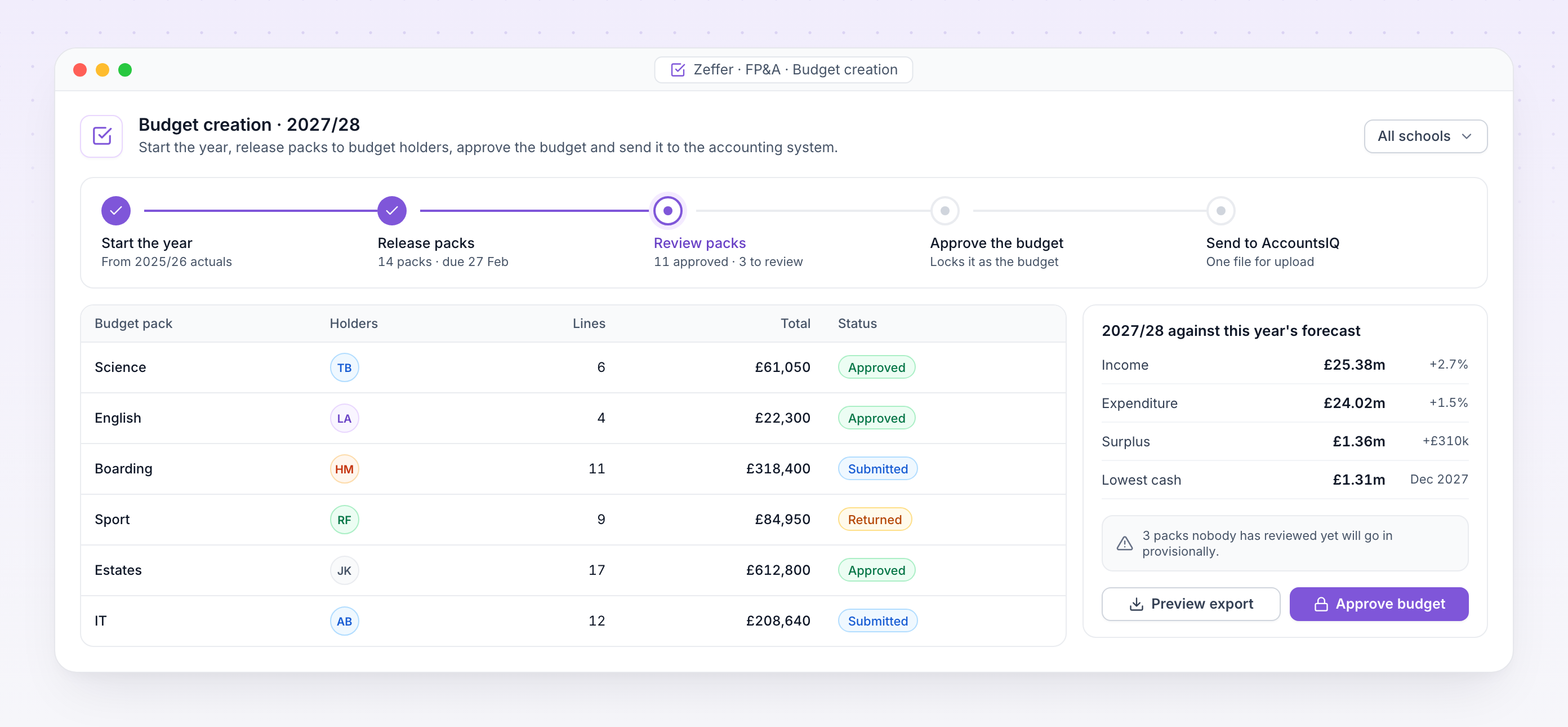
Review, return or approve each pack, and see what is still outstanding.
Approve the budget once. Packs nobody has reviewed go in provisionally.
Export a file your accounting system can upload, for the budget or any later forecast.
Next year's budget part way through review, with each pack's status and a summary against this year

Budget creation. Next year's budget part way through review, with each pack's status and the year set against this year's forecast.
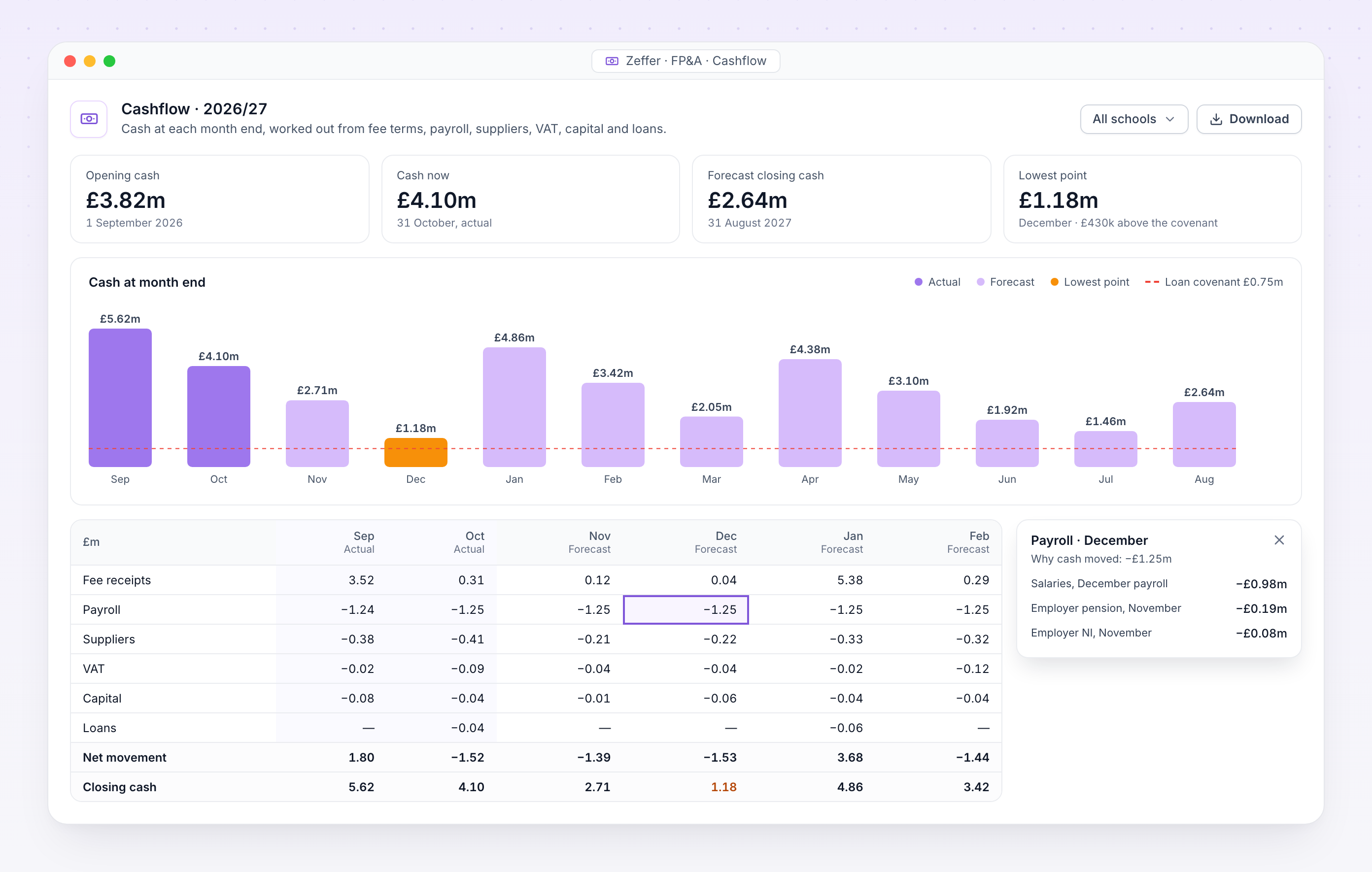
Cashflow with opening, current and closing cash, the lowest point, and why cash moved in December

Cashflow. Opening, current and closing cash with the lowest point named, and why cash moved in any month.

Cash · VAT

Cash, month by month, worked out from what drives it

Most school budgets stop at income and expenditure. Zeffer works out when every pound actually moves, so you see the cash position at each month end, and the month it is lowest, while there is still time to act.

Fees are billed by term date and collected on each fee payment profile, including bad debt.

Salaries, pension and NI leave in the months they are really paid.

Suppliers are paid on each line's own payment terms, invoice by invoice.

VAT is settled with HMRC on your schedule, including payments on account.

Click any figure to see why cash moved: fees, payroll, VAT, capital or loans.

The cashflow, the I&E and the balance sheet come from one set of drivers.

Staff · From HR

Staff costs straight from the HR record

Staff, posts and pay feed in from Zeffer HR. Every job is costed month by month, with employer NI, pension and allowances, and charged to the analysis codes it belongs to.
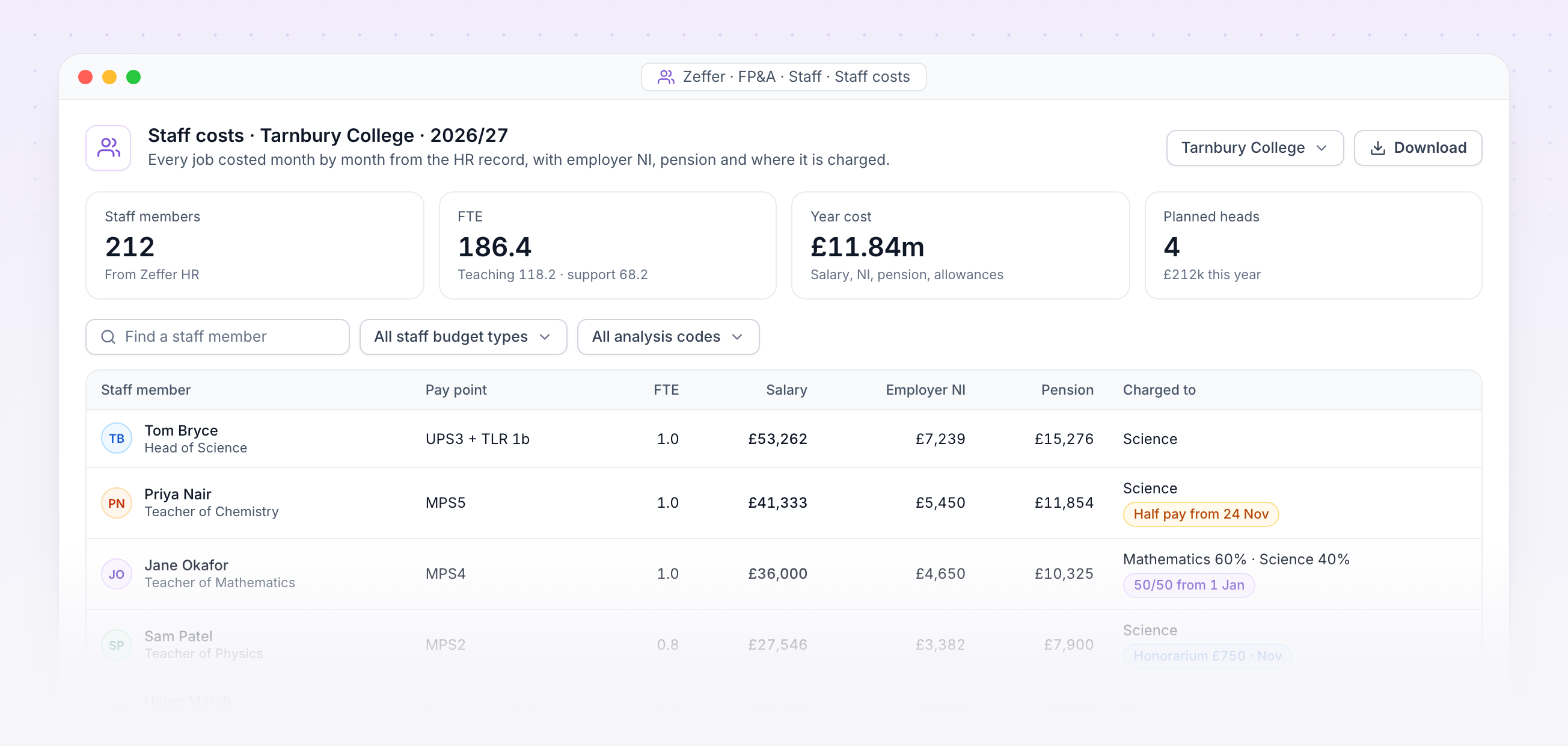
Staff costs for one school with each job's pay point, salary, employer NI, pension and where it is charged

Staff costs. Each job with its pay point, salary, employer NI, pension and where it is charged, with sick pay and one-off payments flagged.

Absence that changes pay

Recorded sickness, unpaid leave and family leave lower the cost for the days they cover.

One-off payments

An honorarium or an approved claim for extra hours is costed in the month it falls.

Charged where it belongs

A job split across analysis codes is costed on each, month by month, to the penny.

Pay scales by year

Staff are costed on the pay scales HR has dated for each year.

Agrees with payroll

The forecast and the payroll change list read the same pay calculation, so they cannot disagree.
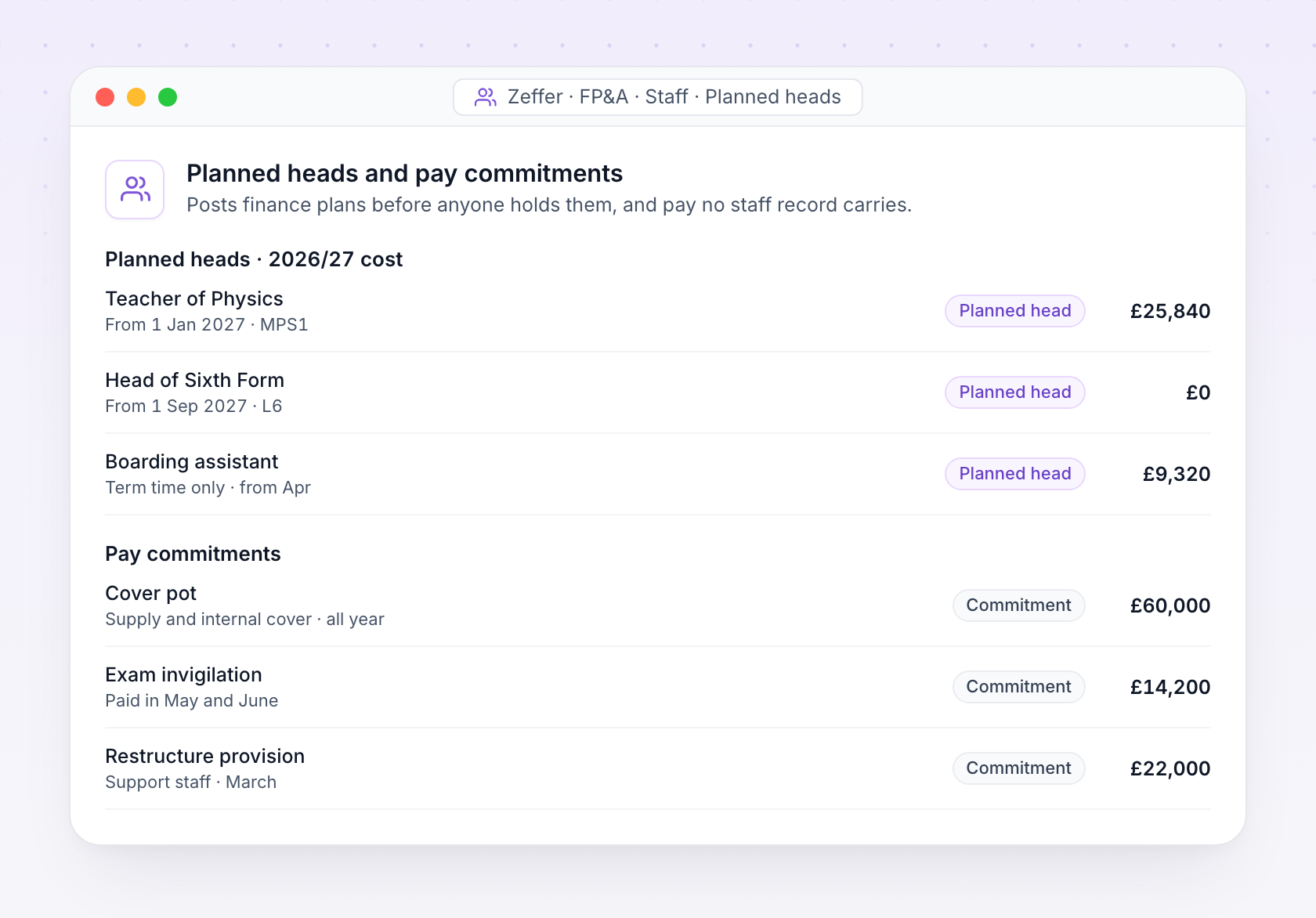
Planned heads and pay commitments with their cost this year
Before anyone holds the post

Planned heads and pay commitments

Plan vacancies and new posts before anyone is appointed, and budget the pay no staff record carries, such as cover, invigilation or a restructure.
No guesses about the future
Only recorded absence and recorded payments change staff costs. Future sickness is never estimated, and a planned head drops out once its post is filled.
Payroll handoff

Works with the payroll you already run

Zeffer works with your payroll provider, whether that is an in-house team or a bureau. Every month it sends them complete, approved changes on time, so nobody re-keys a starter, a pay rise or a sickness absence.
The monthly cycle
1
Zeffer finds every change since the last pay run: joiners, leavers, pay rises, allowances, absences, claims and one-off payments.
2
Someone approves each change, then the payroll is locked at cut-off.
3
Zeffer produces a changes report and an import file, either changes only or the full position. Every download is logged.
4
When the provider's draft run comes back, Zeffer checks it against what was sent and explains any difference.
5
Payslips go back to each person's own space.
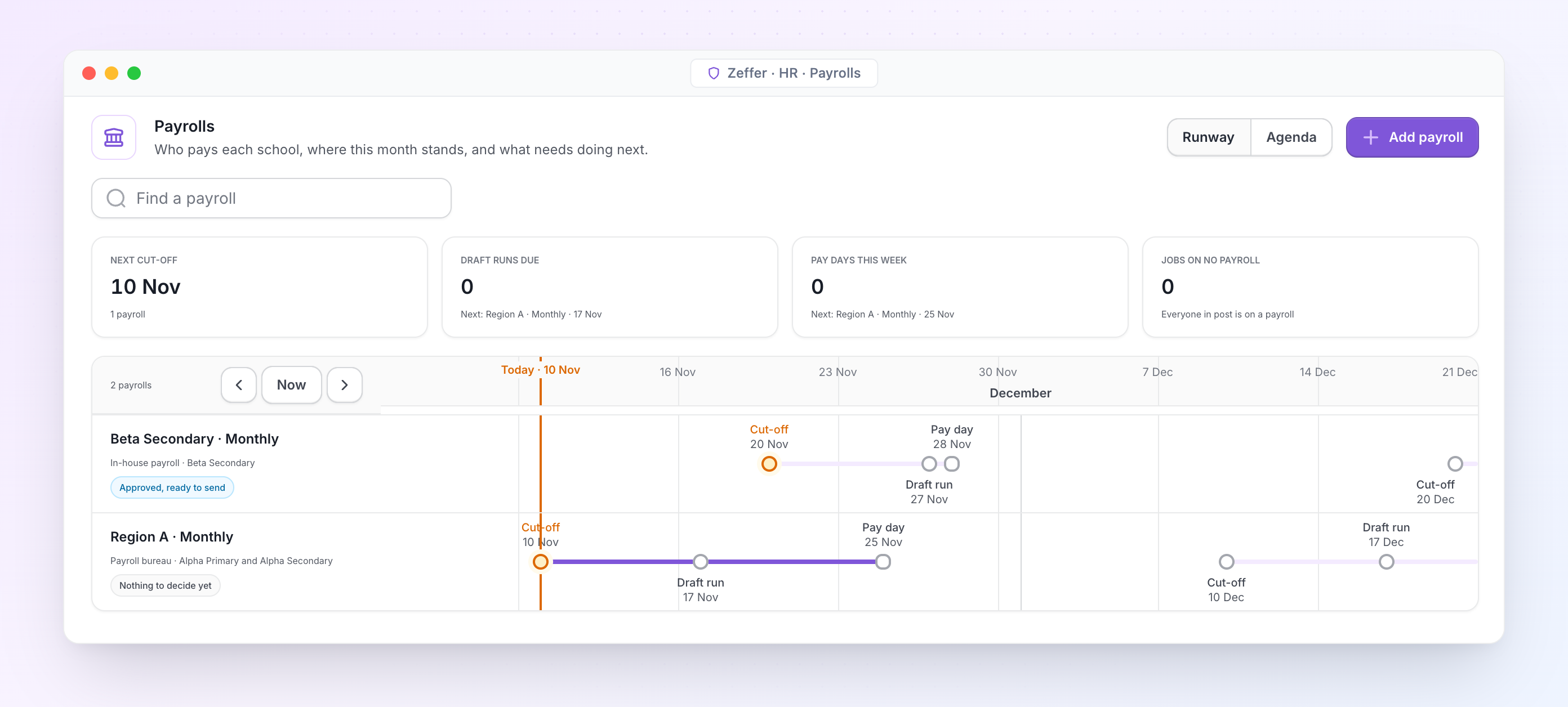
Payrolls with provider, schools, cut-off and pay day
Payrolls. Each payroll has its own provider, schools, cut-off and pay day. A group can run one payroll for every school or one for each.

Pay scales and allowances

Pay scales with points and dated increases, allowances, claim types and pension schemes.

Sick pay and family leave

Their dates and positions hand straight to payroll, so the provider never asks twice.

Charged to the right place

Every job records where it is charged, ready for your finance system.
Integrations

Keep your school’s finances perfectly in sync

Your data can be seamlessly connected to Zeffer and kept in sync to ensure accuracy. This eliminates double entry and reduces time spent on manual checks. Zeffer supports a wide range of applications, with new integrations added regularly.
Integration iconIntegration iconIntegration iconIntegration iconIntegration iconIntegration icon
Support

Frequently asked questions

FAQs outlining how bursars interact with our software and collaborate with our company.
What problem does this forecasting system solve for bursars?
The system brings together student numbers, fee income, staffing costs, and operational expenses into one forward looking model. It allows bursars to see the financial impact of decisions before they’re made. Such as fee increases, staffing changes, or shifts in enrolment, rather than relying solely on historic reports.
Can it model changes in student numbers and enrolment trends?
Yes. The system allows forecasting by year group, entry point, and attrition rates. It can model scenarios such as reduced intake, higher retention, or demographic shifts and immediately show the impact on fee income and staffing requirements.
Can we model different fee strategies?
Absolutely. The system supports modelling fee increases by percentage or by year group, as well as bursaries, scholarships, and discounts. This enables bursars to balance affordability, competitiveness, and financial sustainability.
How much time will it take to maintain?
Once set up, ongoing maintenance is minimal. Most schools update forecasts termly or annually. Adjusting assumptions is quick, allowing bursars to respond rapidly to questions from the head, governors or finance committee.
How does this help with governance and reporting?
The system produces clear, structured outputs that can be shared with the head and governors. It improves confidence in financial discussions by showing the assumptions behind the numbers and providing scenario comparisons rather than static budgets.
How accurate are the forecasts?
Forecast accuracy depends on the quality of the assumptions entered, but the system is designed to be assumption driven and transparent. It shows the best case, expected, and worst-case scenarios so bursars can understand the range of possible outcomes rather than relying on a single figure.
How does it handle staffing costs, which are our largest expense?
Staffing costs can be modelled in detail, including salaries, on-costs, pension contributions, and planned changes. The system allows bursars to test scenarios such as adding posts, restructuring departments, or applying different pay awards and see the long term financial implications.
How does this integrate with our existing finance or MIS systems?
The forecasting system does not replace the finance or MIS system. Instead, it complements them by using summary data (such as student numbers and actual costs) to build forward-looking models. Data can typically be imported via spreadsheets, reducing manual input.
Is the system suitable for multi-year strategic planning?
Yes. The system is designed for 2-to-10-year forecasting, making it suitable for strategic planning, capital projects and long-term sustainability discussions. It helps governors understand whether current decisions support the school’s long-term financial health.
What happens if assumptions change mid-year?
Assumptions can be updated at any time. The system immediately recalculates forecasts, allowing bursars to respond to changes such as unexpected enrolment shifts, cost pressures, or regulatory changes.
Avatar photoAvatar photoAvatar photo

Start your free trial

Can’t find the answer you’re looking for? Please contact our friendly team.