HR software for independent schools, international schools and school groups
One place for safeguarding, recruitment, training, absence and payroll, built around Keeping Children Safe in Education and ready for inspection or accreditation on any day.
One system for everything an independent school needs from HR
Zeffer holds every member of staff, every check, every post and every payroll in one place, whether you run one school or a group with schools in the UK and overseas. The things a school has to get right, such as the single central record and safer recruitment, are the core of the product, not add-ons.
Made for independent schools
Single central record, safer recruitment, safeguarding roles, boarding, term-time contracts and inspection packs are built in, and work out of the box.
Made for inspection
The central record, an inspection pack as at any date, the safer-recruitment training register and the allegations register are ready whenever the inspection or accreditation team arrives.
Made for groups
Each school sits under the company, charity or foundation that employs its staff, in the UK or abroad. Group leaders see the whole group; school teams see only their own school.
Made for staff
Every member of staff gets their own space for leave, payslips, policies, claims and requests, with decisions that come back with who made them.
Zeffer HR
Eight connected areas, one record for each person
Everything below works from the same staff record, so a check, a course or a pay change only has to be entered once.
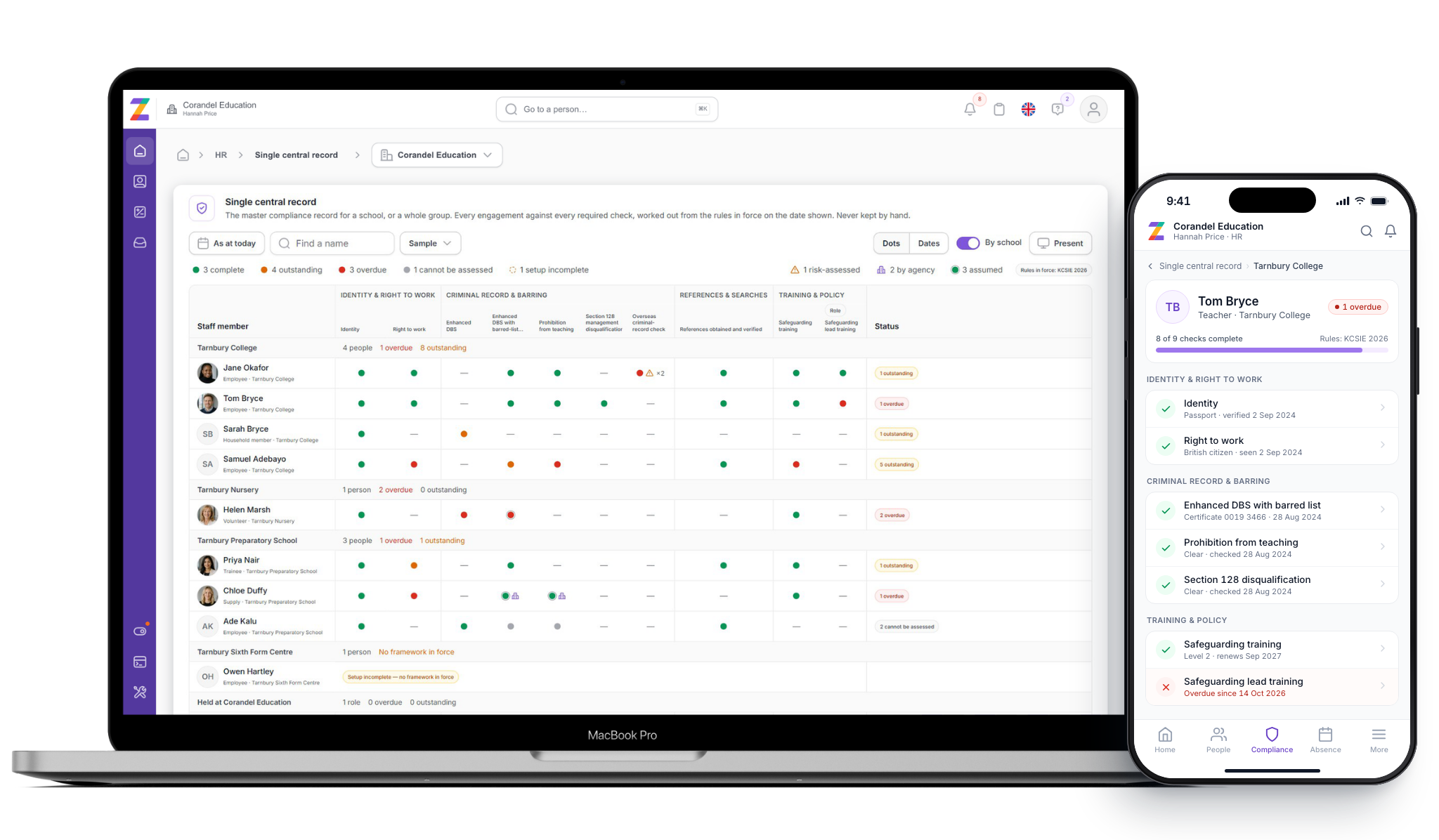
A single central record that keeps itself up to date
Zeffer works out which checks each person needs from their role, their history and the edition of KCSIE in force on the day. Nobody maintains the register by hand, so it is always ready for an inspection.
18 check types
Identity, right to work, enhanced DBS and barred list, prohibition from teaching, section 128, overseas criminal records, references, online searches and qualifications.
Overseas checks worked out
From each person's residence history, using the rule of six months or more abroad in the last ten years, so staff who have taught in other countries are checked properly.
Everyone who should be on it
Employees, supply and agency staff, volunteers, governors and trustees, proprietors, contractors, and adults living in boarding households.
Inspection pack as at any date
The central record and a file-completeness report for each person, ready to download.
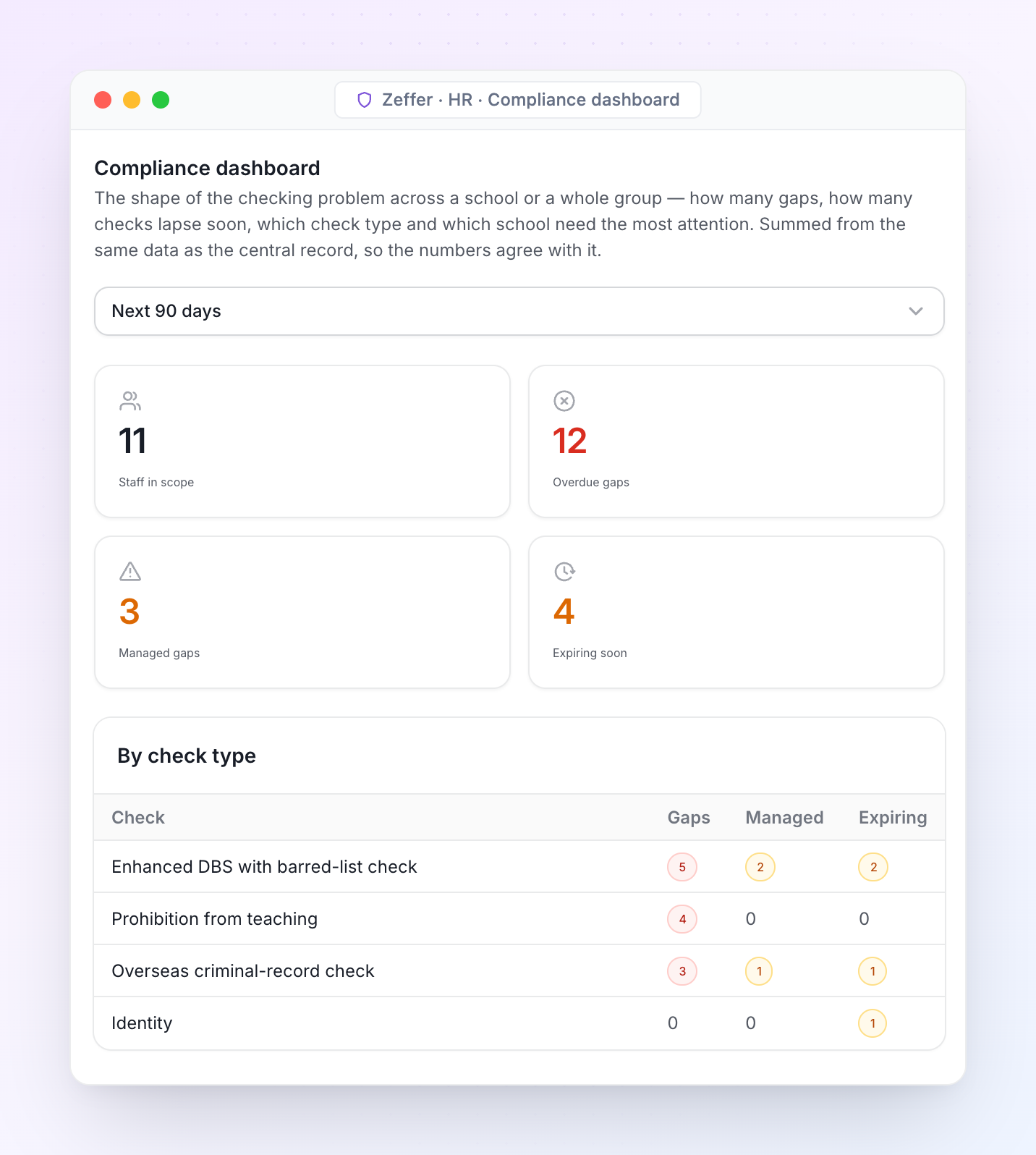
Compliance clocks run every day
For expiring visas, training renewals, risk-assessment reviews, policy reads and rule changes.
Sensitive by design
Safeguarding records are never shown by default, and certificate numbers can never appear in an export.
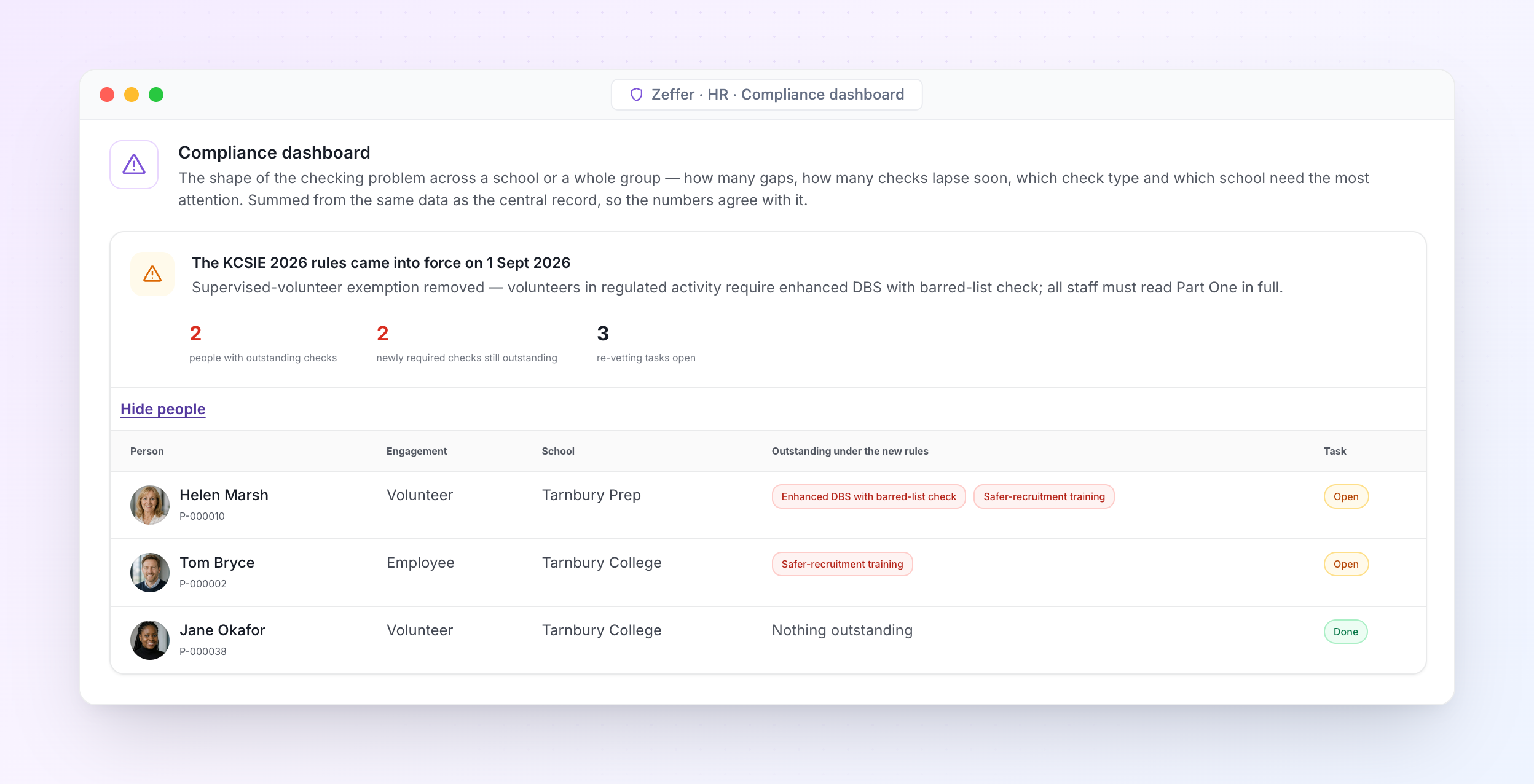
When the rules change, Zeffer re-checks everyone. When KCSIE 2026 came into force, Zeffer applied it on the day and listed who needed new checks.
School-specific · The rules
Keeping up with Keeping Children Safe in Education
KCSIE is the standard independent schools in England must follow, and the one many British schools overseas adopt. Each edition is held in Zeffer as a dated set of rules. On the day a new edition comes into force, Zeffer re-checks every person against it and lists who needs a new check.
Editions in Zeffer today
KCSIE 2025
KCSIE 2026
Managed gaps: a missing check with a risk assessment in place is shown as managed until its review date, never hidden and never counted as complete.
Agency confirmation: supply staff are complete only when their agency has confirmed its checks in writing, and the confirmation is kept.
Verifiers kept: who saw the original of each document and when, carried through to the inspection pack.
Every check is dated against the edition that required it, so the record as at any past date is still right.
Recruitment · Applicant tracking
Recruitment from vacancy to first day
Zeffer runs recruitment for every school in your group, from the vacancy to the new starter's record, whether you hire locally or internationally. Safer recruitment is built into each step, so nobody reaches an offer with a gap in their file.
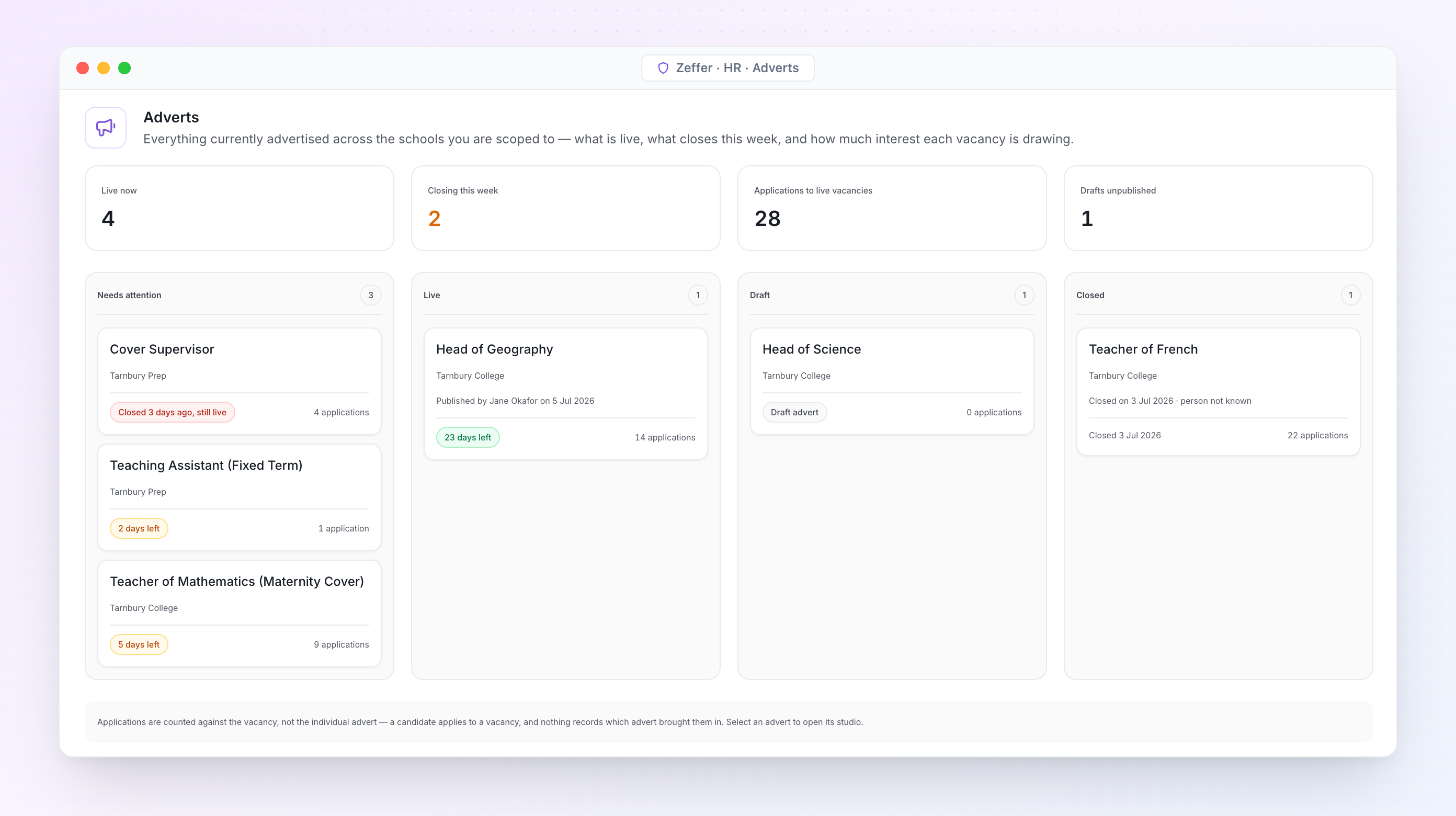
Adverts. Every advert across your schools: what needs attention, what closes this week and how many applications each vacancy has drawn.
Vacancy to advert
Vacancies are raised against a post and approved before they can be advertised, with a record of who approved them.
Advert studio with a live preview. An advert cannot go live without an approved vacancy, a closing date and a safeguarding statement.
Re-advertise a closed advert in one step, keeping the original on file.
Shortlist to offer
A pipeline from applied to shortlisted, interviewing, offered and hired, with every move kept.
Offers built from a pay scale point or a set salary, with allowances, sent as a letter from your own template.
Each offer lists the checks it depends on, so conditional offers stay conditional until the checks clear.
School-specific · Safer recruitment
Every application checked before interview
The application form, the panel and the references each follow safer-recruitment practice. Zeffer shows what is missing while there is still time to fix it.
Employment history
Every job since leaving education on a timeline. Any break longer than 28 days is found automatically and must be explained.
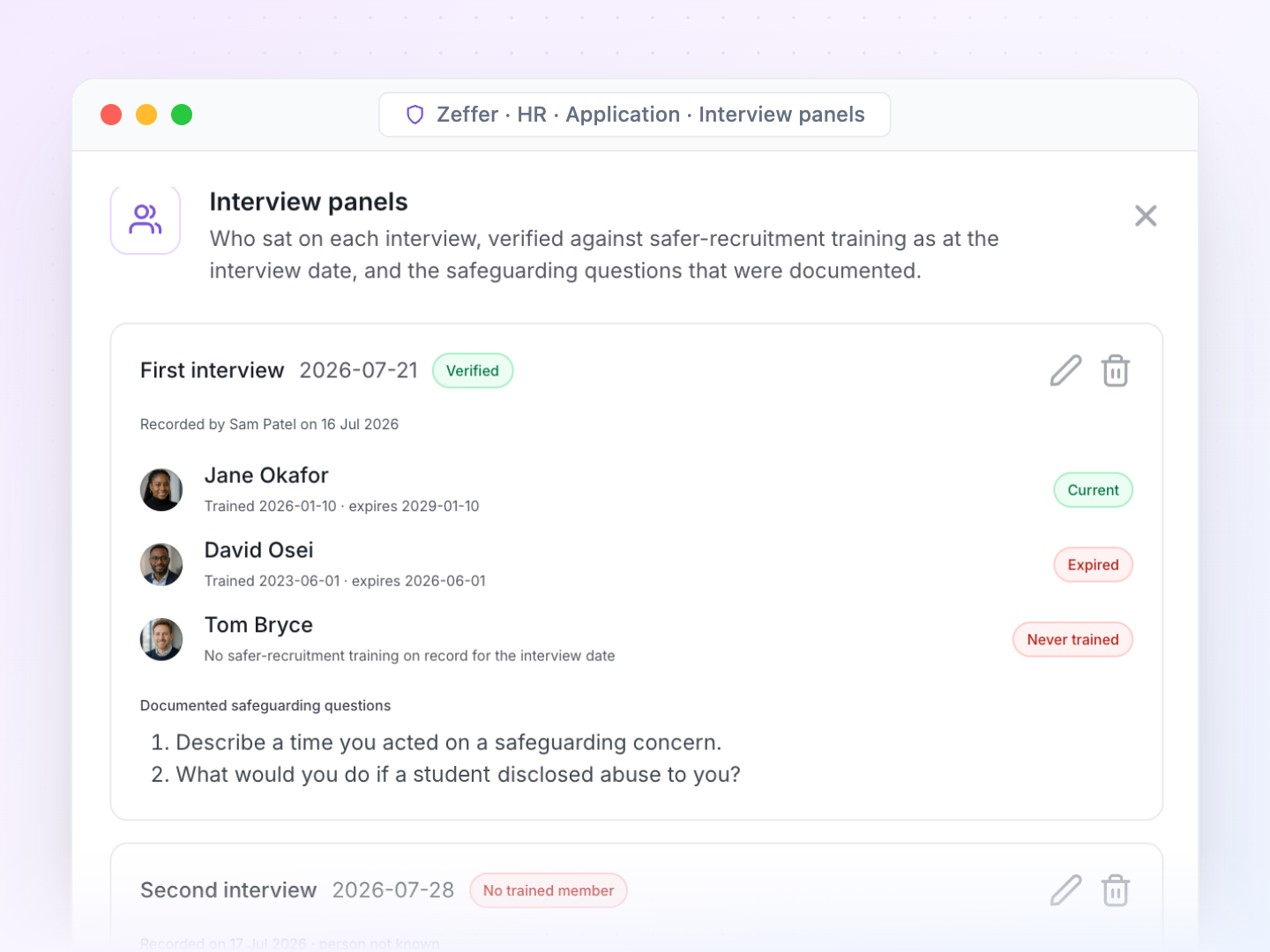
Interview panels
Each panel is checked for a member with current safer-recruitment training on the interview date.
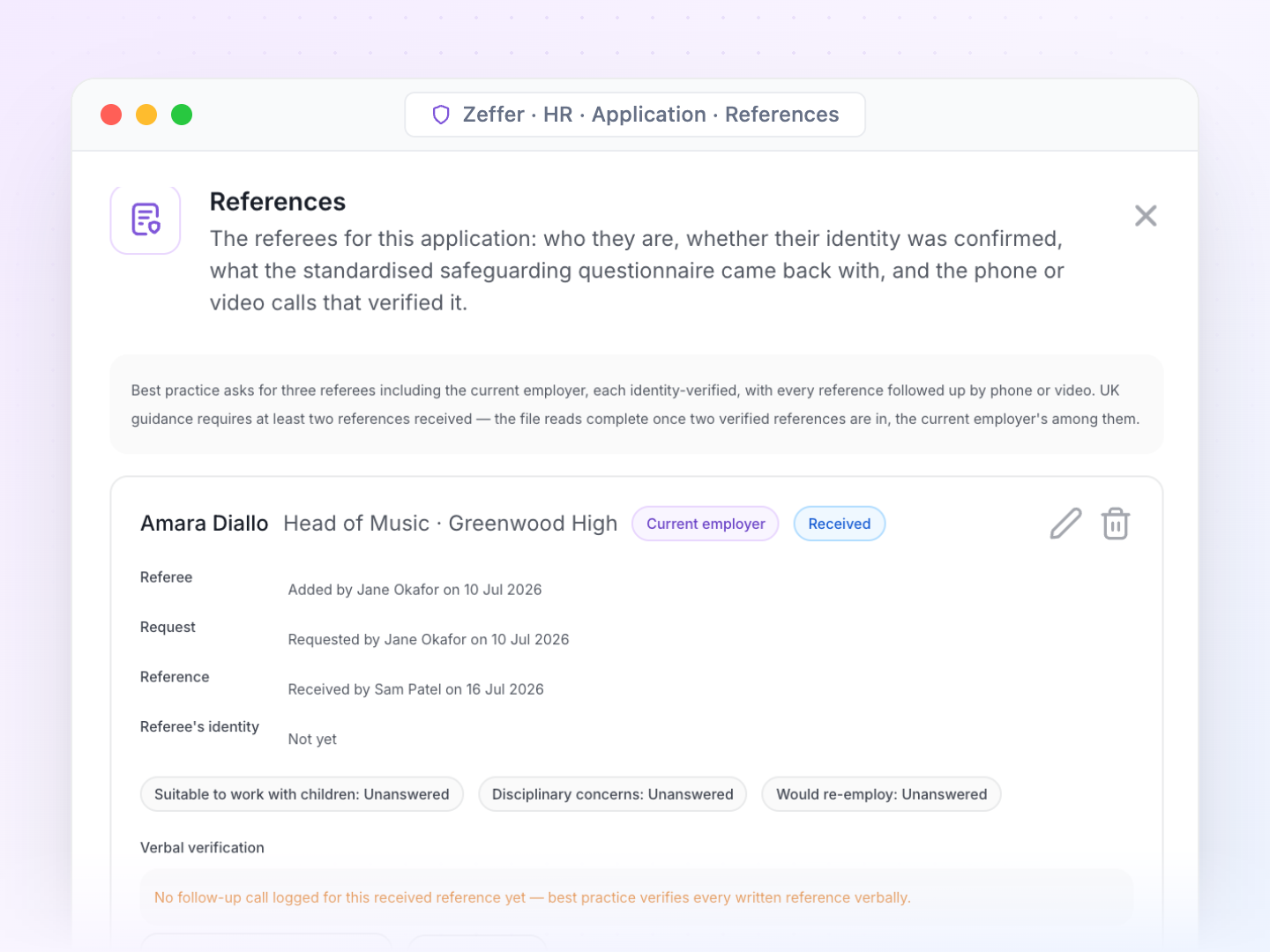
References
At least two, including the current employer, each with the referee's identity confirmed and follow-up calls logged.
Full work history, not a CV, plus a safeguarding statement and a declaration on every application.
Online searches on shortlisted candidates, recorded as a check.
References collected from shortlisting onwards, before interview.
Hire in one step: history, references and checks carry onto the person's record and the central record.
School-specific · People and posts
Staff roles that understand how schools work
Zeffer holds teaching, support, leadership, boarding and peripatetic posts in each school's departments, and lets one person hold more than one job. A post's role decides which checks its holder needs.
School structure
Posts by department, with a staff category, a budgeted headcount, and flags for work with children and for management.
Departments for each school, with optional accounting codes.
Term calendars and public holidays for each school's country or region.
For a group, every screen can be viewed for one school or the whole group.
The right access for each role
Set access per role at None, View, Edit or Full for each area of HR.
Four separate keys to sensitive data: personal, pay, health and safeguarding, never granted automatically.
Nobody approves their own request. Leave, claims, pay changes and references always go to someone else.
Full history of who changed what and when, on every HR record.
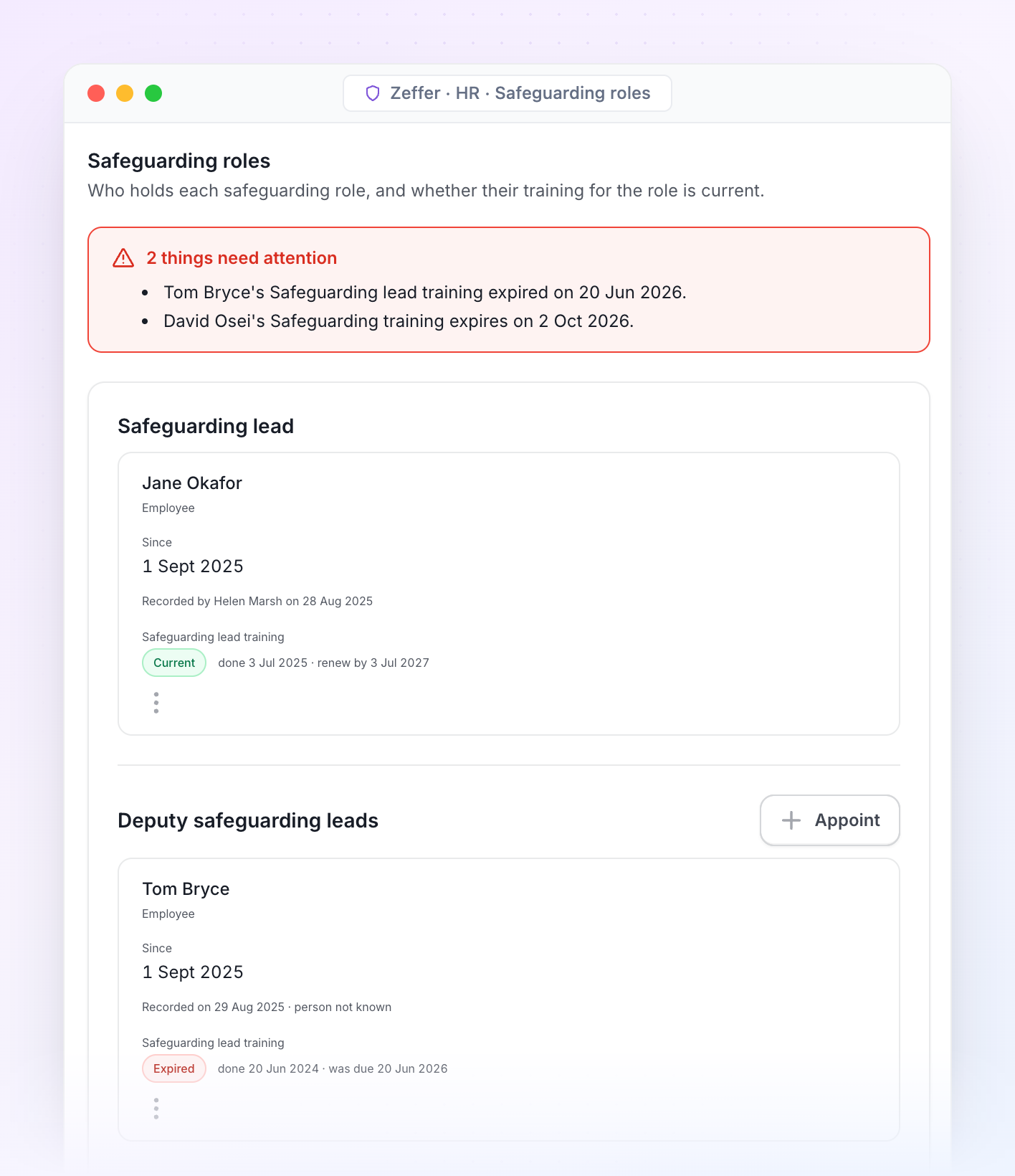
Safeguarding roles. Who holds the designated safeguarding lead, deputy and safeguarding governor or trustee roles in each school, and whether each holder's training is still current.
School-specific · Inspection
Ready for inspection or accreditation on any day
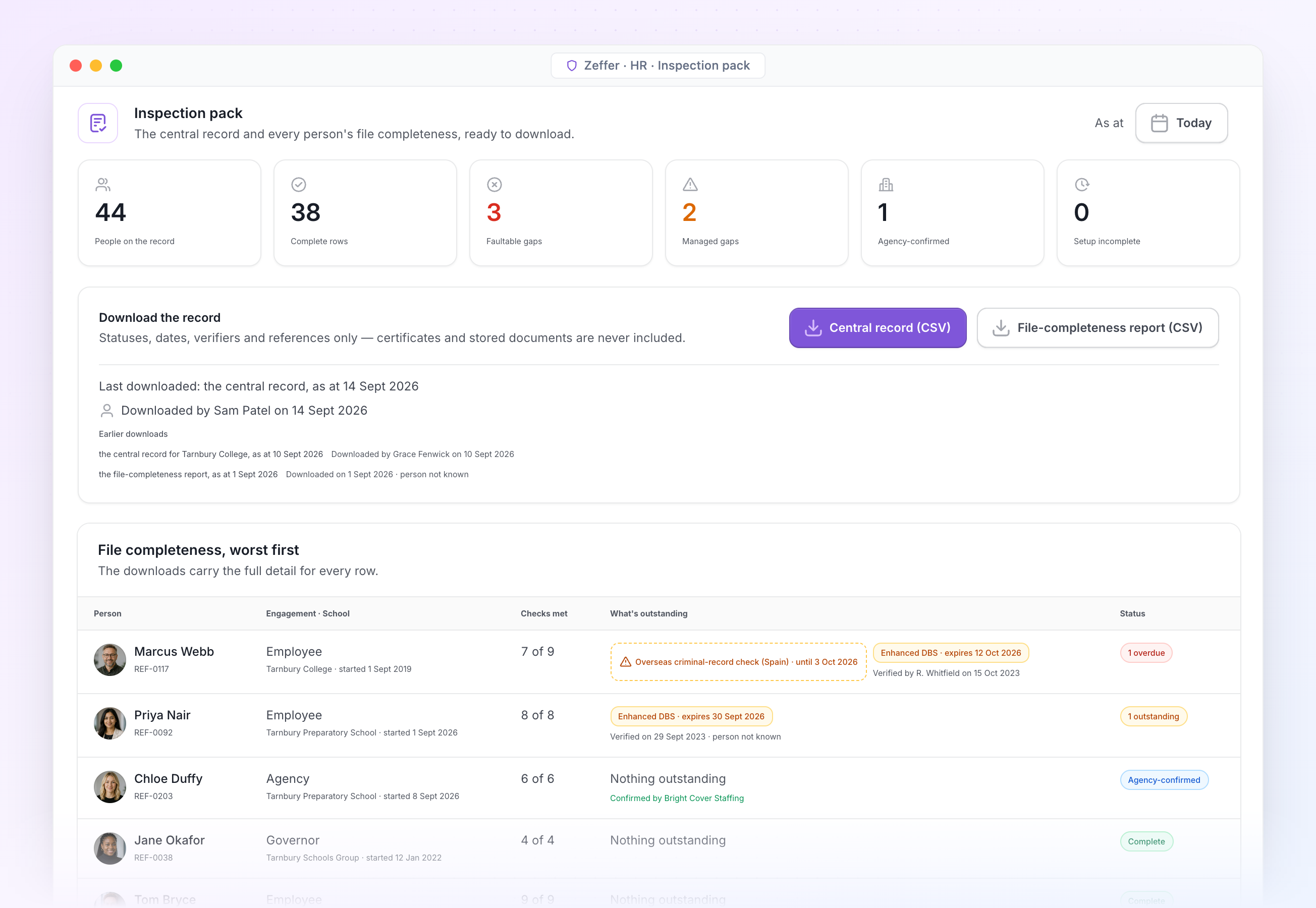
The inspection pack is the central record as at any date, with a file-completeness report for every person. Download it the morning the inspection or accreditation team arrives, or the day before term starts.
Inspection pack. Counts, downloads and a worst-first list of who still has something outstanding. Every download is logged.
Allegations register
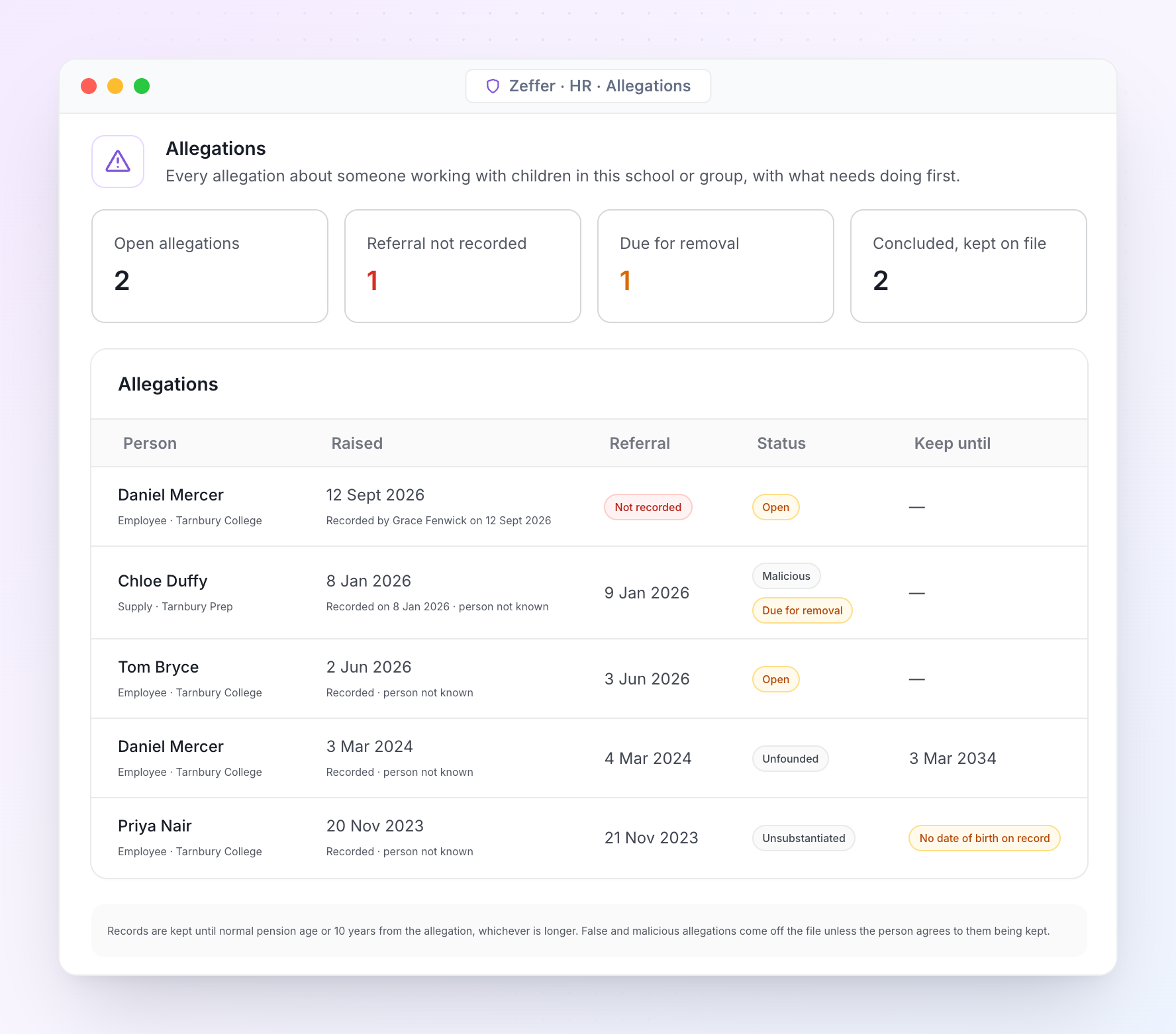
Every allegation about someone working with children, its referral to the designated officer, the outcome and how long it is kept. Only holders of the safeguarding key can open it.
Kept alongside the pack
Every register an inspector asks to see
The central record is only part of the evidence. The registers that sit around it live in Zeffer too, dated and signed off, so nothing has to be pulled together from spreadsheets on the day.
Central record and file-completeness report as spreadsheets, as at any date. Certificates and stored documents are never included.
Governance reviews and sign-offs by the safeguarding lead and the safeguarding governor or trustee, with dates and who took part.
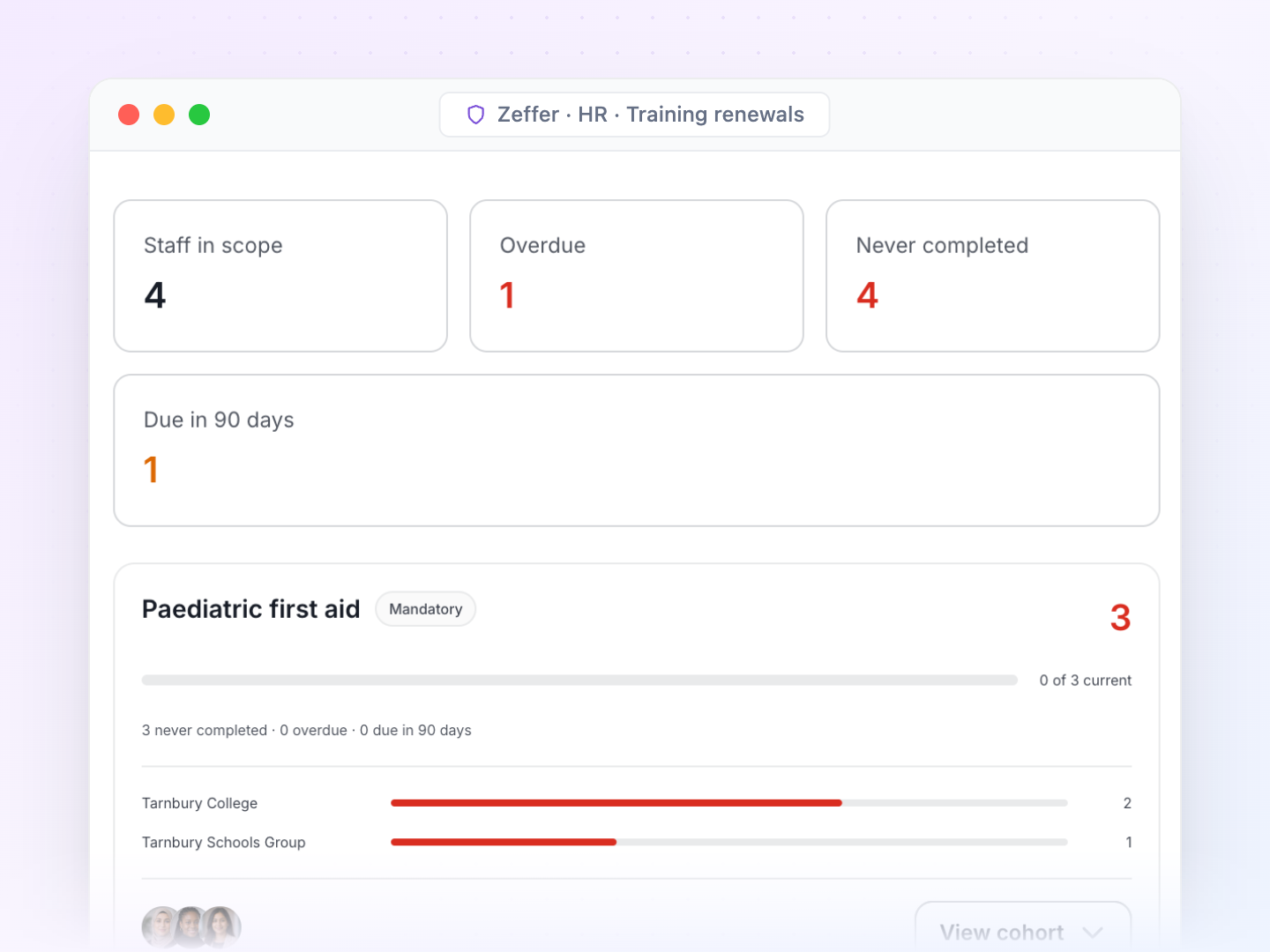
Safer-recruitment training register: who is trained, who is lapsing and who may sit on a panel.
Risk-assessed gaps with their review dates, shown as managed in the pack.
Register of interests and the safeguarding roles register, kept alongside.
Allegations handled the way KCSIE expects
Referral to the designated officer is recorded with its date. Records are kept until normal pension age or ten years from the allegation, whichever is longer, and false or malicious allegations come off the file unless the person agrees to them being kept.
CPD · Training · Appraisal
Training and appraisal that keep compliance current
Completing a course in Zeffer updates the single central record, so training renewals and safeguarding checks never drift apart.
Training
A training catalogue with mandatory courses and your own renewal periods.
Completing a course records the matching check on the central record with its renewal date.
Record a whole training session for everyone who attended in one go.
Appraisal
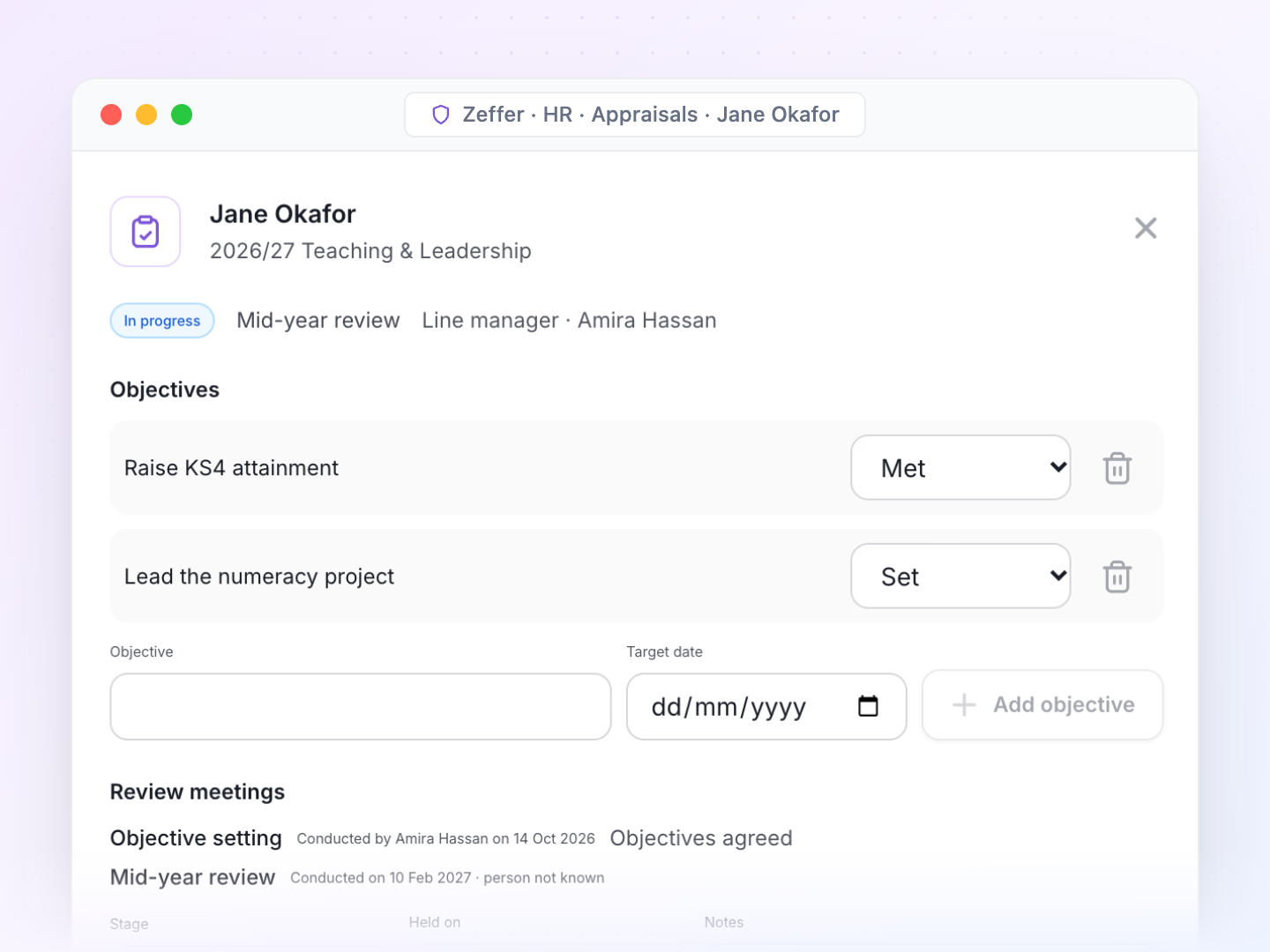
Appraisal cycles for each school and year, with stages, deadlines, and who is included or exempt.
Teaching, support and leadership versions of the appraisal.
The reviewer can be a line manager, the governors, the proprietor or an external reviewer.
Absence · Leave · Cover
Absence and cover across every school
Leave, sickness and cover in one place, worked out against each person's contract, work pattern and school calendar.
Absence policies per school: leave year, entitlement, carry-over, time off in lieu and restricted dates.
Holiday entitlement worked out for part-year and term-time staff, with every change to a balance kept.
Sick pay schemes banded by length of service, and each person's sick pay position.
Family leave with keeping-in-touch days and a handoff to payroll.
Absence triggers that alert you to patterns, with an optional Bradford factor.
Cover raised from the absence and filled by a colleague or an agency worker, whose agency confirmation lands on the central record.
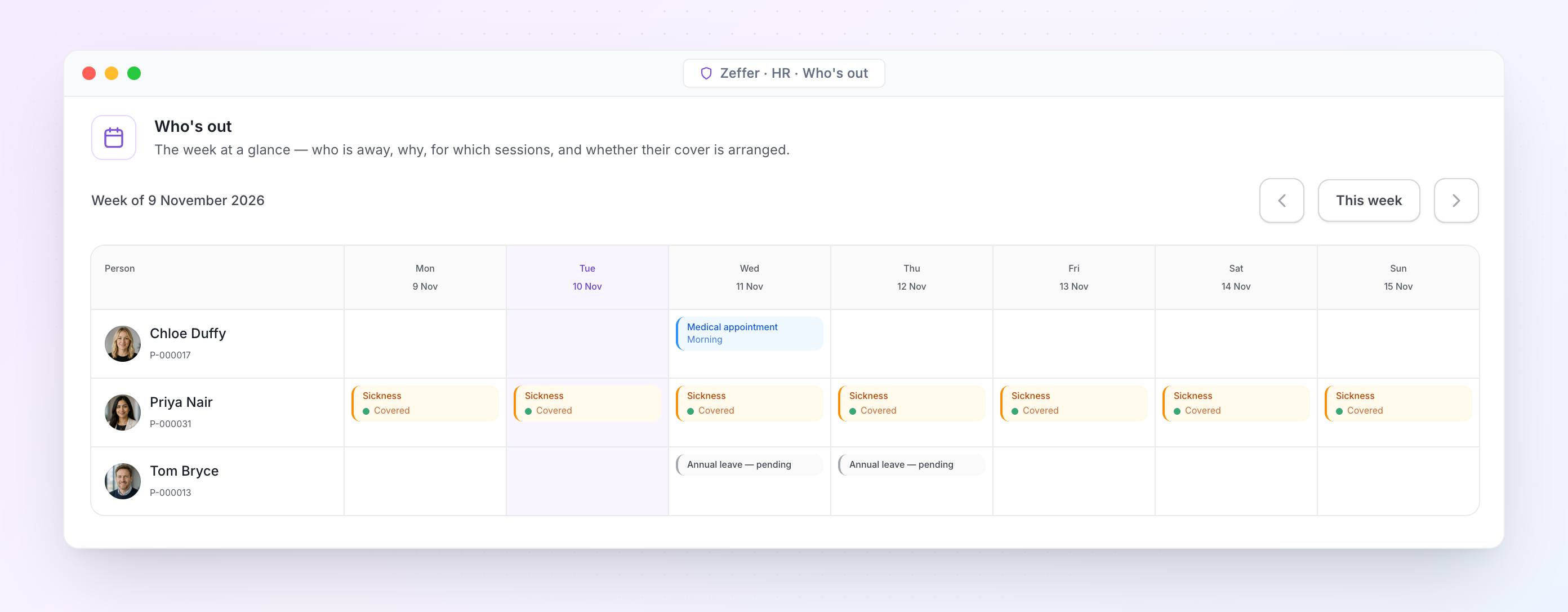
Who's out. The week at a glance: who is away, why, for which part of the day, and whether their cover is arranged.
Joiners · Leavers · References
Joining and leaving without loose ends
Checklists make sure every new starter is ready for their first day and every leaver leaves cleanly.
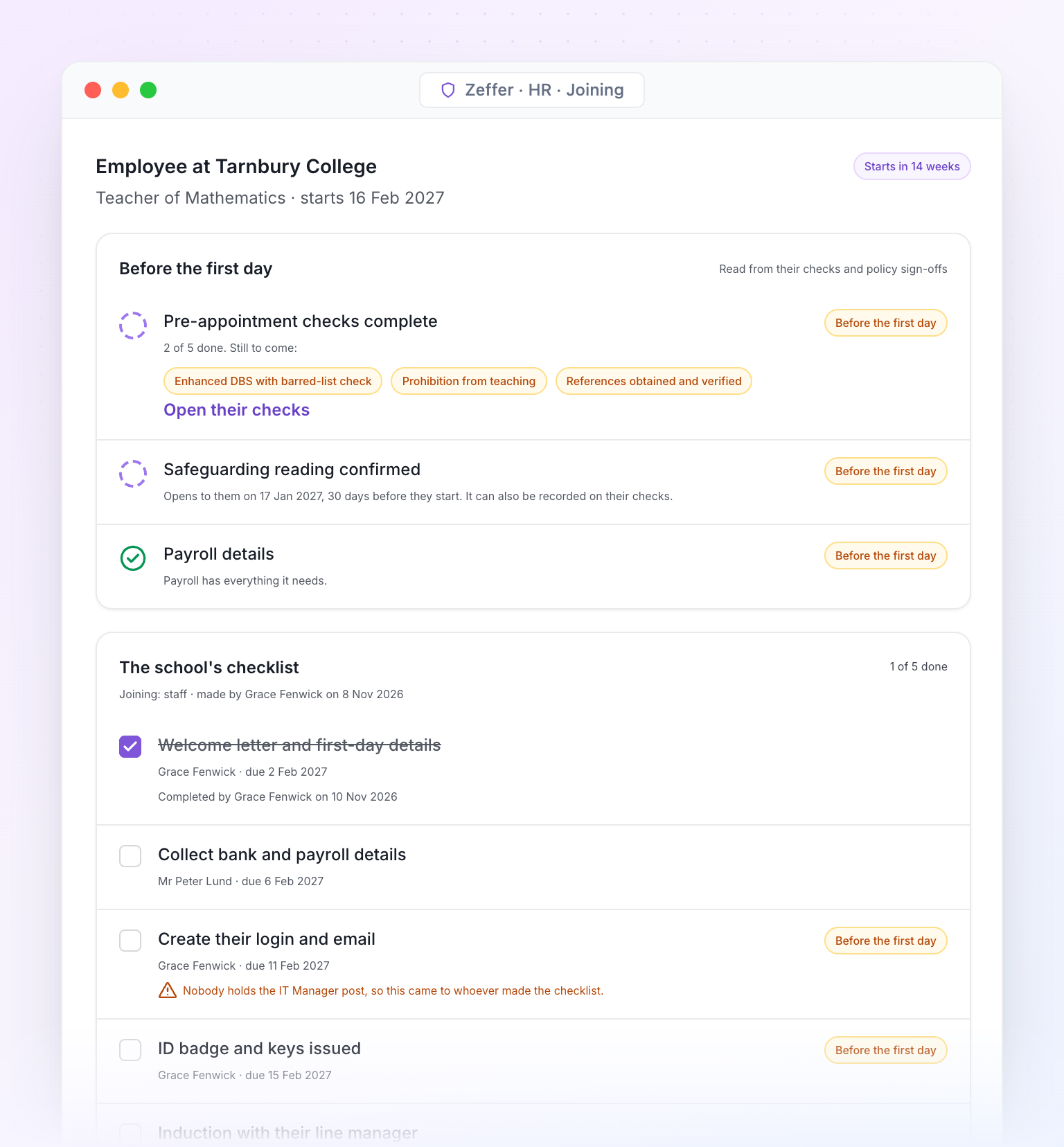
Joining checklists for each new starter. Pre-appointment checks and payroll details must be done before the first day.
Checklist templates per school, or set once for the group and used by every school.
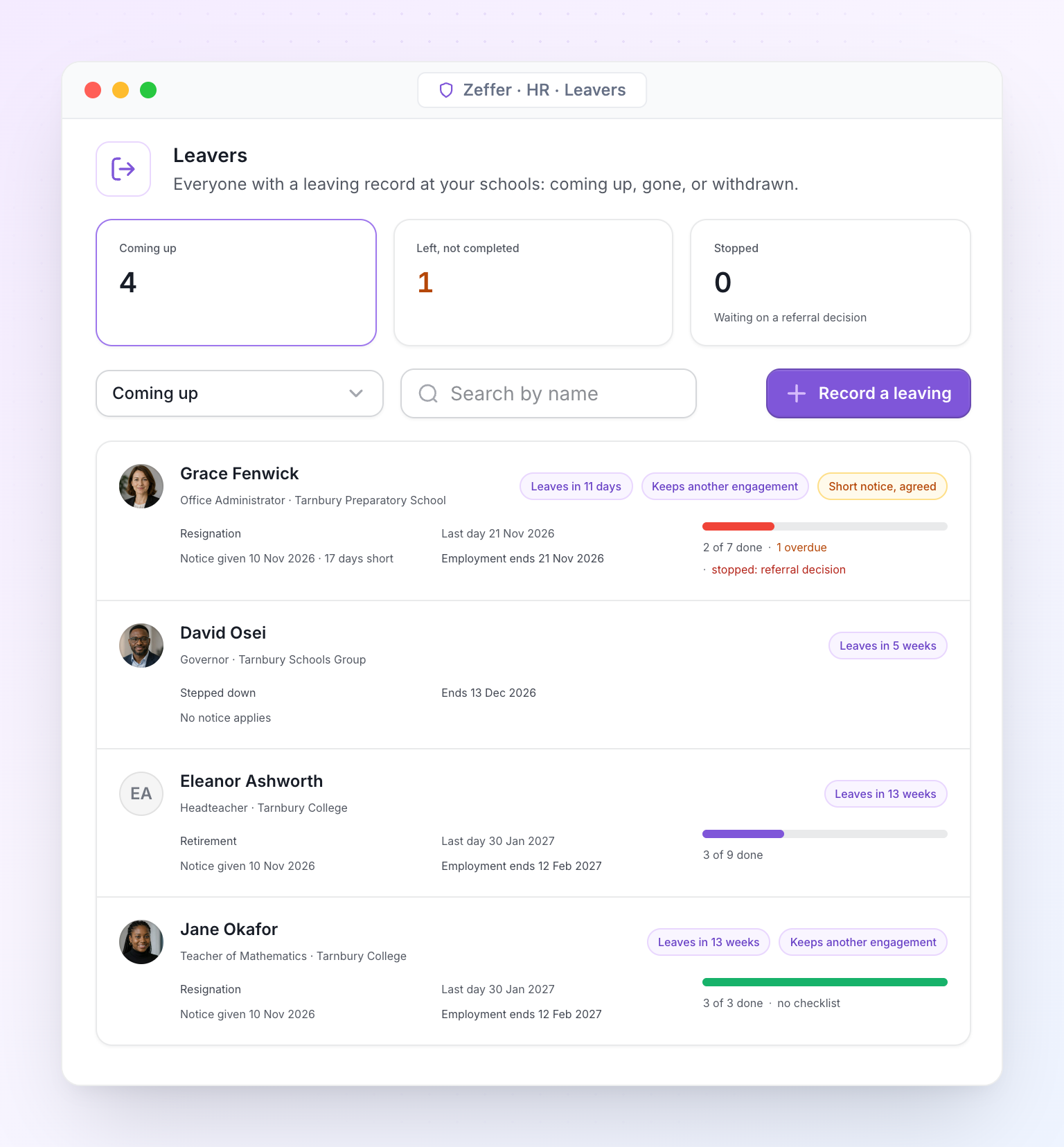
Leaving record with reason, notice and final pay facts. Completing it can remove the leaver's login.
Issued items such as laptops and keys, with returns and overdue items tracked.
Exit interviews the leaver can answer in their own space, with summaries that hide any group smaller than five.
References given within your own reference policy: drafted, approved and logged.
Joining. What must be done before the first day, then the school's own checklist.
Leavers. Everyone who is leaving, their last day and how far their offboarding checklist has got.
Payroll handoff
Works with the payroll you already run
Zeffer works with each payroll provider you use, whether that is an in-house team, a bureau or a local provider for a school abroad. Every month it sends them complete, approved changes on time, so nobody re-keys a starter, a pay rise or a sickness absence.
The monthly cycle
1
Zeffer finds every change since the last pay run: joiners, leavers, pay rises, allowances, absences, claims and one-off payments.
2
Someone approves each change, then the payroll is locked at cut-off.
3
Zeffer produces a changes report and an import file, either changes only or the full position. Every download is logged.
4
When the provider's draft run comes back, Zeffer checks it against what was sent and explains any difference.
5
Payslips go back to each person's own space.
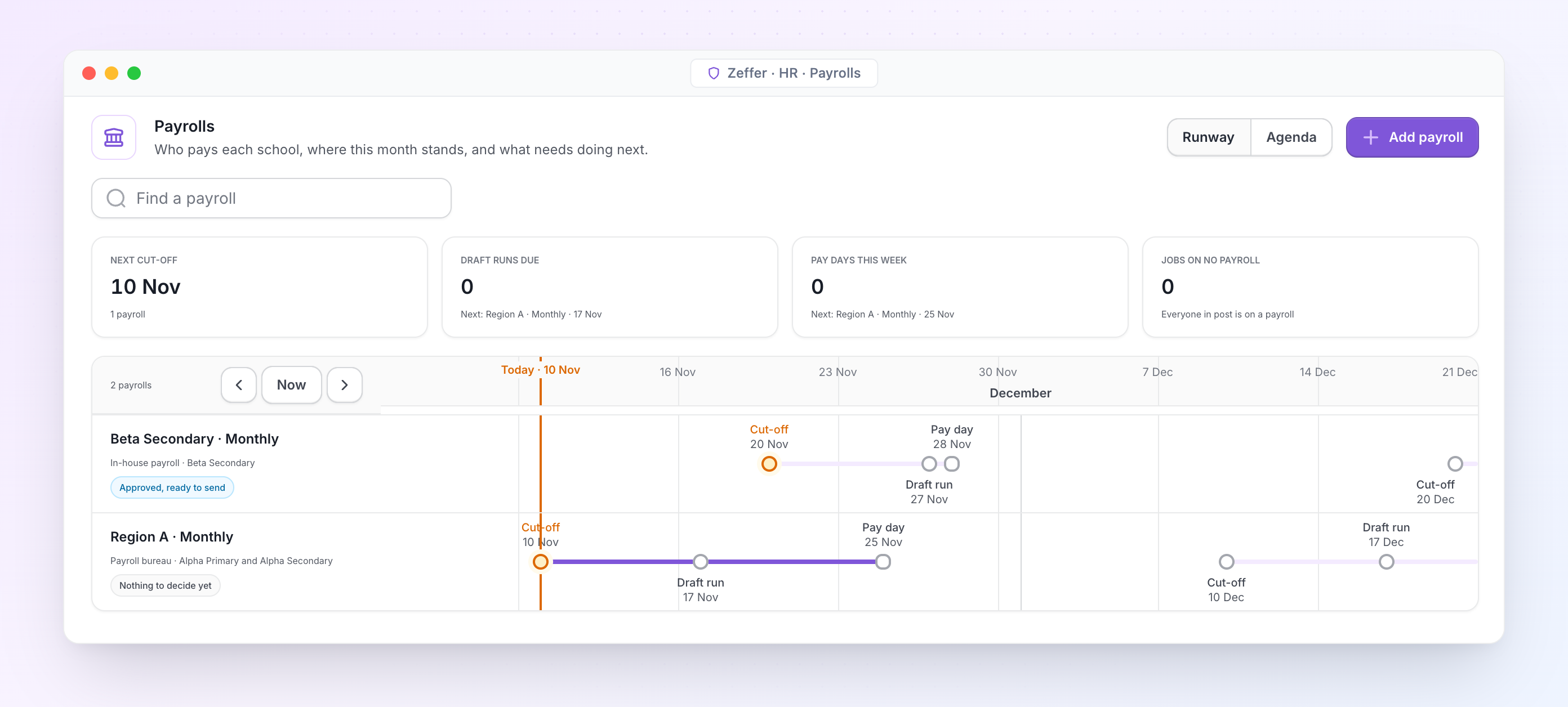
Payrolls. Each payroll has its own provider, schools, cut-off and pay day. A group can run one payroll for every school or one for each.
Pay scales and allowances
Pay scales with points and dated increases, allowances, claim types and pension schemes.
Sick pay and family leave
Their dates and positions hand straight to payroll, so the provider never asks twice.
Charged to the right place
Every job records where it is charged, ready for your finance system.
Staff self-service
Each person’s own space
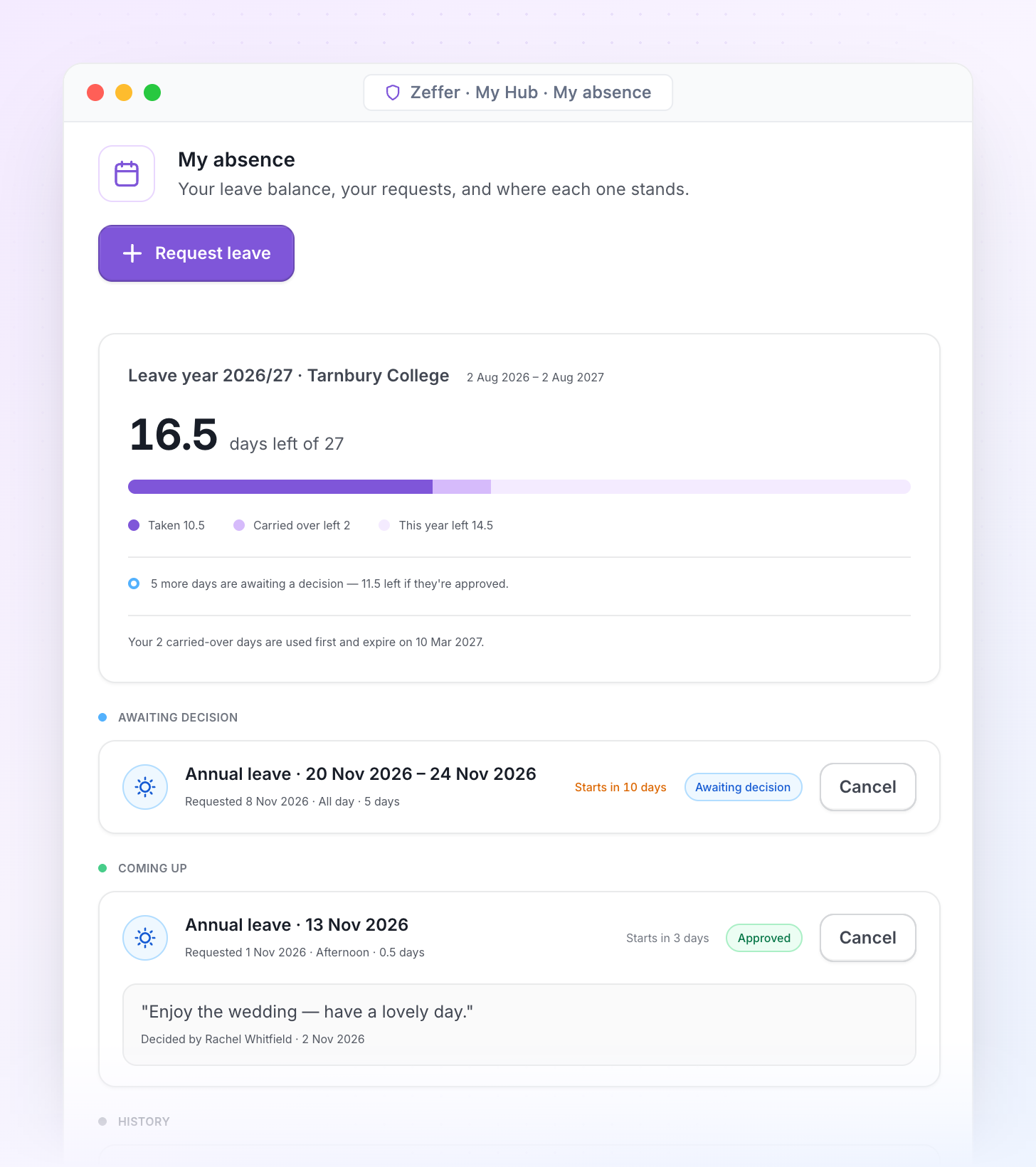
Every member of staff signs in to My Hub to request leave, read payslips, submit claims and read policies. Decisions come back with who made them, so the HR office stops being the place people go to ask.
Leave and balances
Warnings before a request is sent, and the decision shown with who made it.
Payslips and pay
Payslips and annual statements, newest first, once each payroll has run.
Claims
Expenses and extra hours, sent to the right approver.
Policies to read
With a record of who has read what, including the safeguarding reading a new starter must confirm.
Tasks and requests
Joining checklist items, exit interviews and other requests.
My record
Each person sees their own details and asks for a change, which someone else approves.
Next steps
Getting started with Zeffer HR
We would like to show Zeffer to your HR team, with an independent school or group set up like yours.
Step 1: Demonstration
A walk-through of safer recruitment, the single central record, the inspection pack, absence and payroll, using sample data for a school like yours.
Step 2: Discovery
Set up your school or group, posts and payroll providers in Zeffer, and bring your staff records across.
Step 3: Go live
Your first payroll month in Zeffer, with your central record and inspection pack ready from day one.
Screens show Zeffer with sample data for a fictional school group.
Does Zeffer keep our single central record up to date?
Yes. Zeffer works out which checks each person needs from their role, their history and the edition of KCSIE in force on the day, so nobody maintains the register by hand. When a new edition comes into force, it re-checks everyone and lists who needs a new check.
Can we produce an inspection pack at short notice?
Yes. The inspection pack is the central record as at any date, with a file-completeness report for every person. You can download it the morning the inspector calls, and every download is logged.
Do we have to change our payroll provider?
No. Zeffer works with your in-house team or bureau. Every month it sends complete, approved changes, and when the provider's draft run comes back, Zeffer checks it against what was sent and explains any difference.
Does Zeffer work for a school group, including schools overseas?
Yes. Each school sits under the company, charity or foundation that employs its staff, in the UK or abroad. Group leaders see the whole group, school teams see only their own school, and checklists or payrolls can be set once for the group or per school.
How do staff use Zeffer?
Every member of staff gets My Hub, their own space to request leave, read payslips, submit claims, read policies and answer requests. Decisions come back with who made them.