
Independent schools

Smarter financial management for independent schools

Plan with confidence, collaborate across departments, and gain complete visibility of your school’s finances.
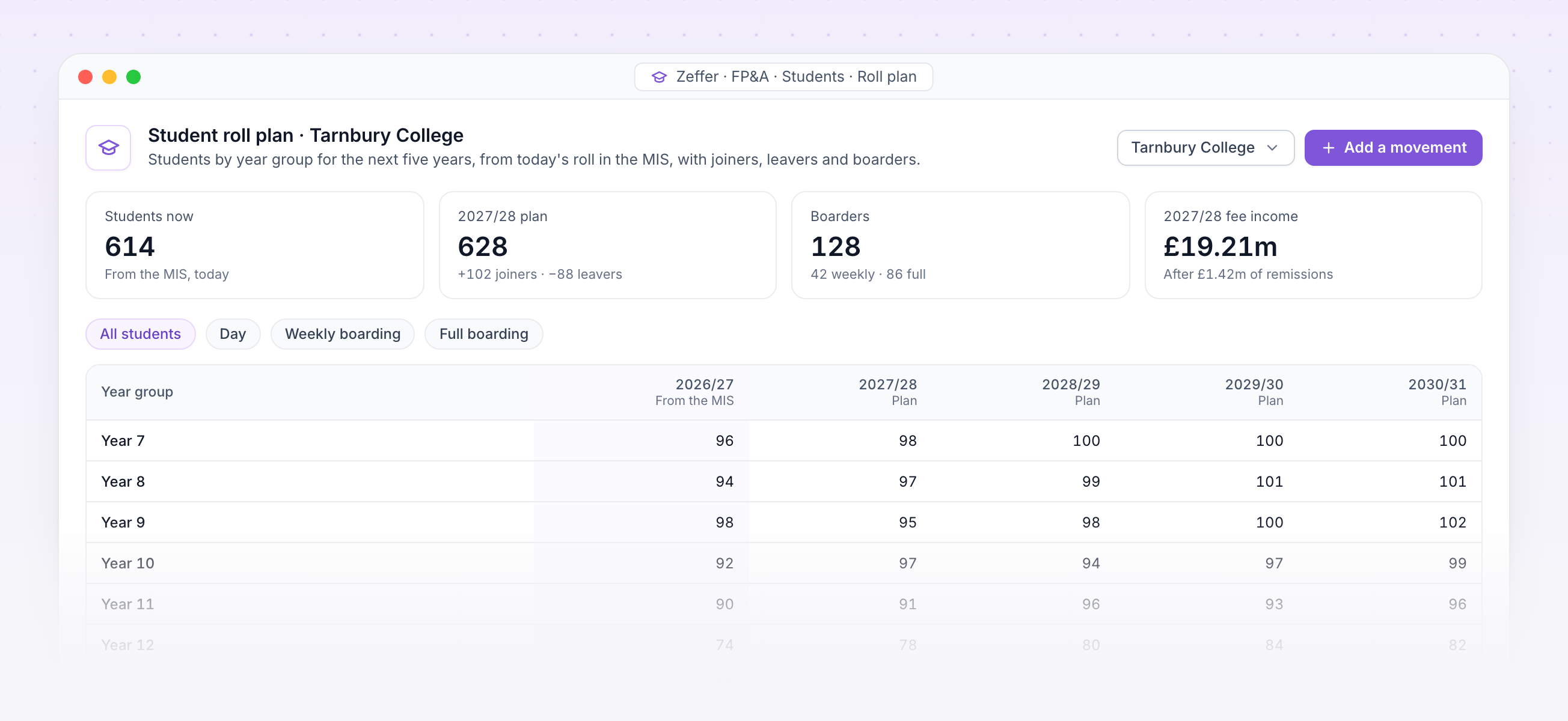
Student roll plan by year group for five years, from today's roll in the MIS

Student roll plan. Students by year group for the next five years, from today's roll in the MIS, with the fee income that follows.

Students · Fees

Fee income worked out from your students

Students sync from your MIS by year group and boarding type. Zeffer charges each at the termly fee, takes off remissions, and bills and collects by your term dates and fee payment profiles.

The roll and the plan

Today's roll comes from your MIS, by school, year group and boarding type.
Project the roll forward year by year, with joiners, leavers and each year group moving up.
Fee income follows the plan, so a change in numbers reaches the I&E and the cash at once.

Fees, remissions and deposits

Termly fees by year group and boarding type, with additional fees on their own nominals.
Bursaries, scholarships and staff remissions come off as negative income.
Fees in advance are held as a liability and released over the terms they cover.
Deposits are held when a student joins and returned when they leave.
Strategic · Scenarios

Plan five years ahead and test the what-ifs

A strategic forecast runs the year forward for as many years as you need, each opening on the last one's year end. Layer assumptions on a fixed starting point and compare scenarios side by side.

Scenarios

Model a new boarding house, a fee change or a different roll, each as its own forecast.

Stress tests

Push the assumptions to extremes, such as a 10% fall in the roll, and see where the plan breaks.

Pay awards and rates

Set the pay award, fee increases and inflation for each scenario's later years.

A new starting point

Move a scenario onto newer actuals or the approved budget, and keep its assumptions.

Joiners and leavers

Students and staff joining or leaving in-year, owned by the scenario, not the budget.

Shared with governors

Share a scenario with named governors, so the board sees the same plan as finance.
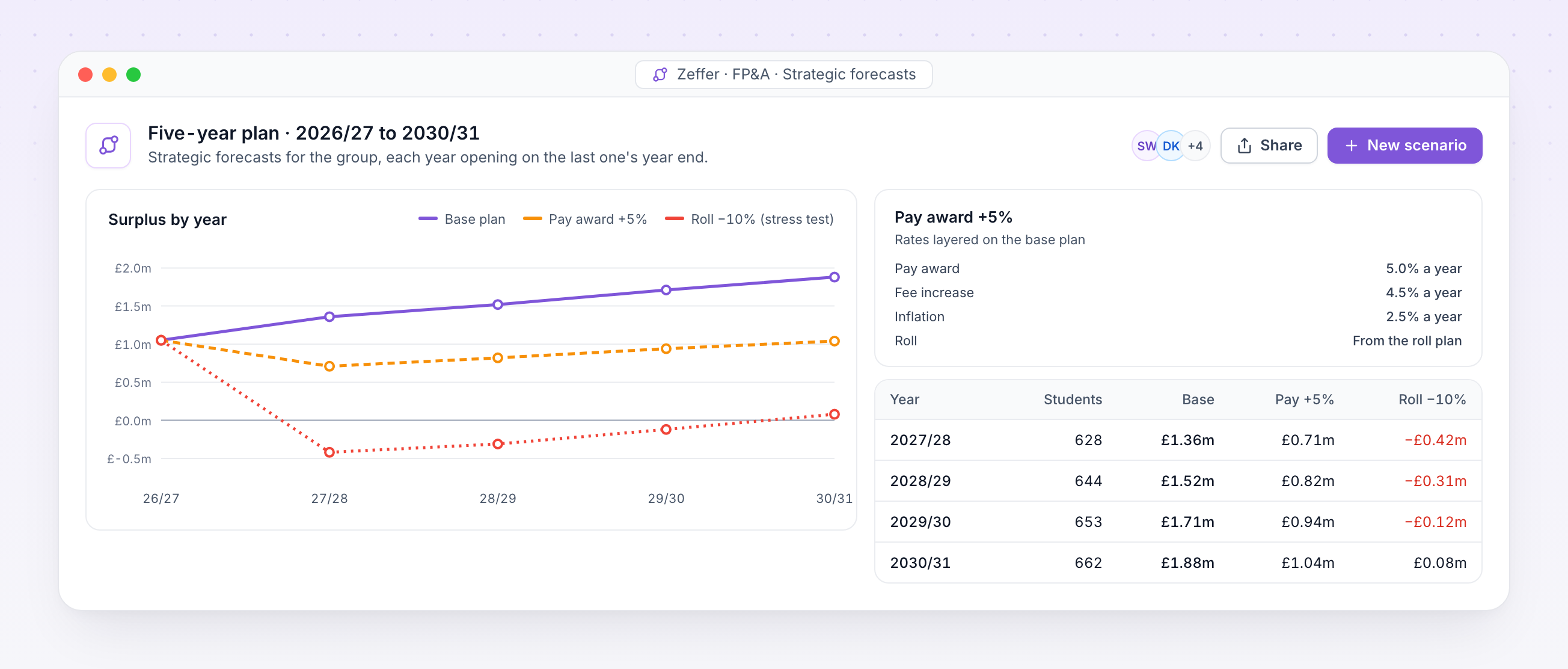
Five-year plan comparing surplus by year for a base plan, a pay award scenario and a roll stress test
School compliance · Safeguarding

A single central record that keeps itself up to date

Zeffer works out which checks each person needs from their role, their history and the edition of KCSIE in force on the day. Nobody maintains the register by hand, so it is always ready for an inspection.

18 check types

Identity, right to work, enhanced DBS and barred list, prohibition from teaching, section 128, overseas criminal records, references, online searches and qualifications.

Overseas checks worked out

From each person's residence history, using the rule of six months or more abroad in the last ten years.

Everyone who should be on it

Employees, supply and agency staff, volunteers, governors, proprietors, contractors, and adults living in boarding households.

Inspection pack as at any date

The central record and a file-completeness report for each person, ready to download.

Compliance clocks run every day

For expiring visas, training renewals, risk-assessment reviews, policy reads and rule changes.

Sensitive by design

Safeguarding records are never shown by default, and certificate numbers can never appear in an export.
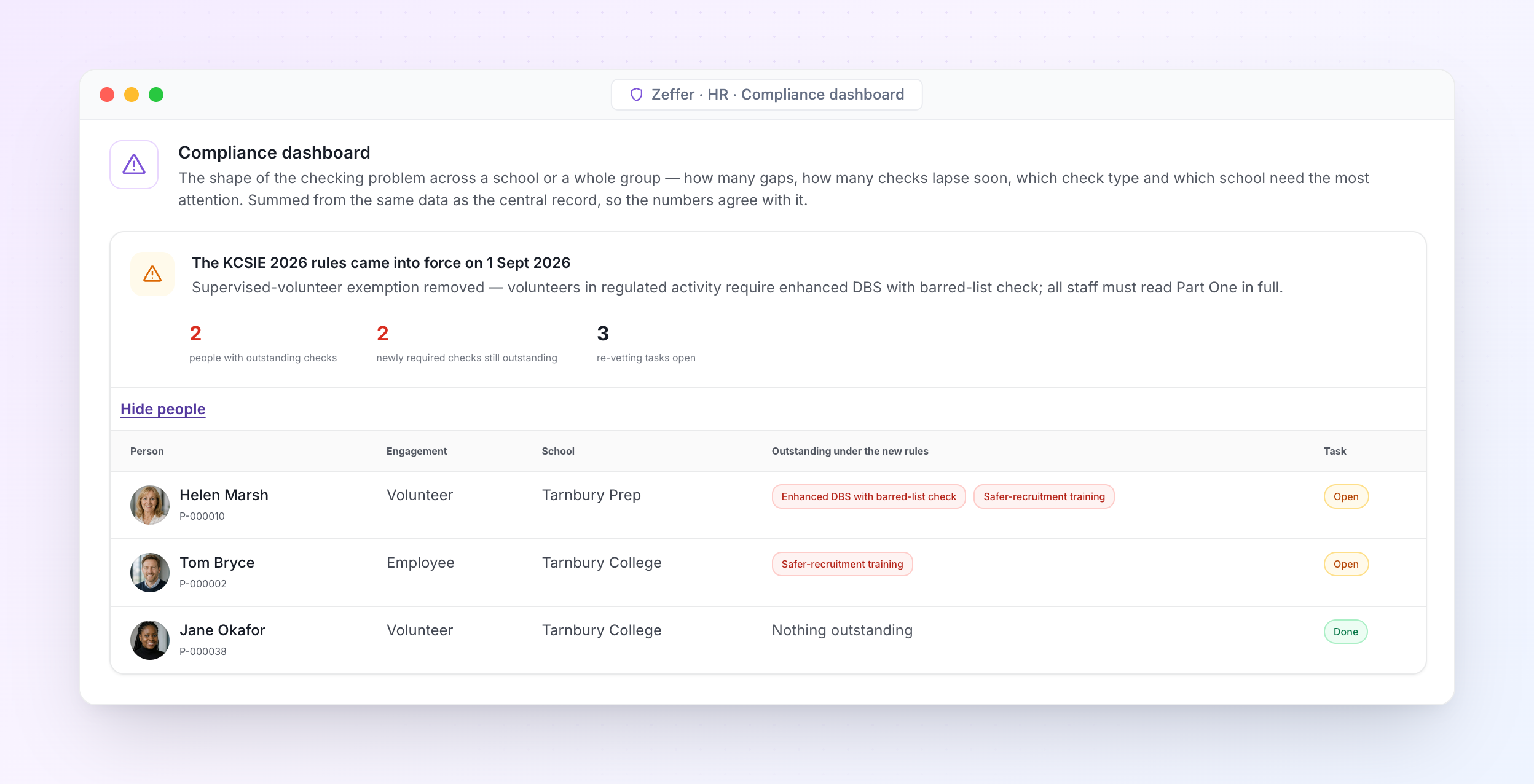
Zeffer listing who needs new checks after KCSIE 2026 came into force
When the rules change, Zeffer re-checks everyone. When KCSIE 2026 came into force, Zeffer applied it on the day and listed who needed new checks.
Recording · Concerns

Record a concern in under a minute

Any member of staff can log what they saw or heard, in the child's own words where possible. Zeffer asks only for what the safeguarding team needs to act, then files it straight into the child's chronology.
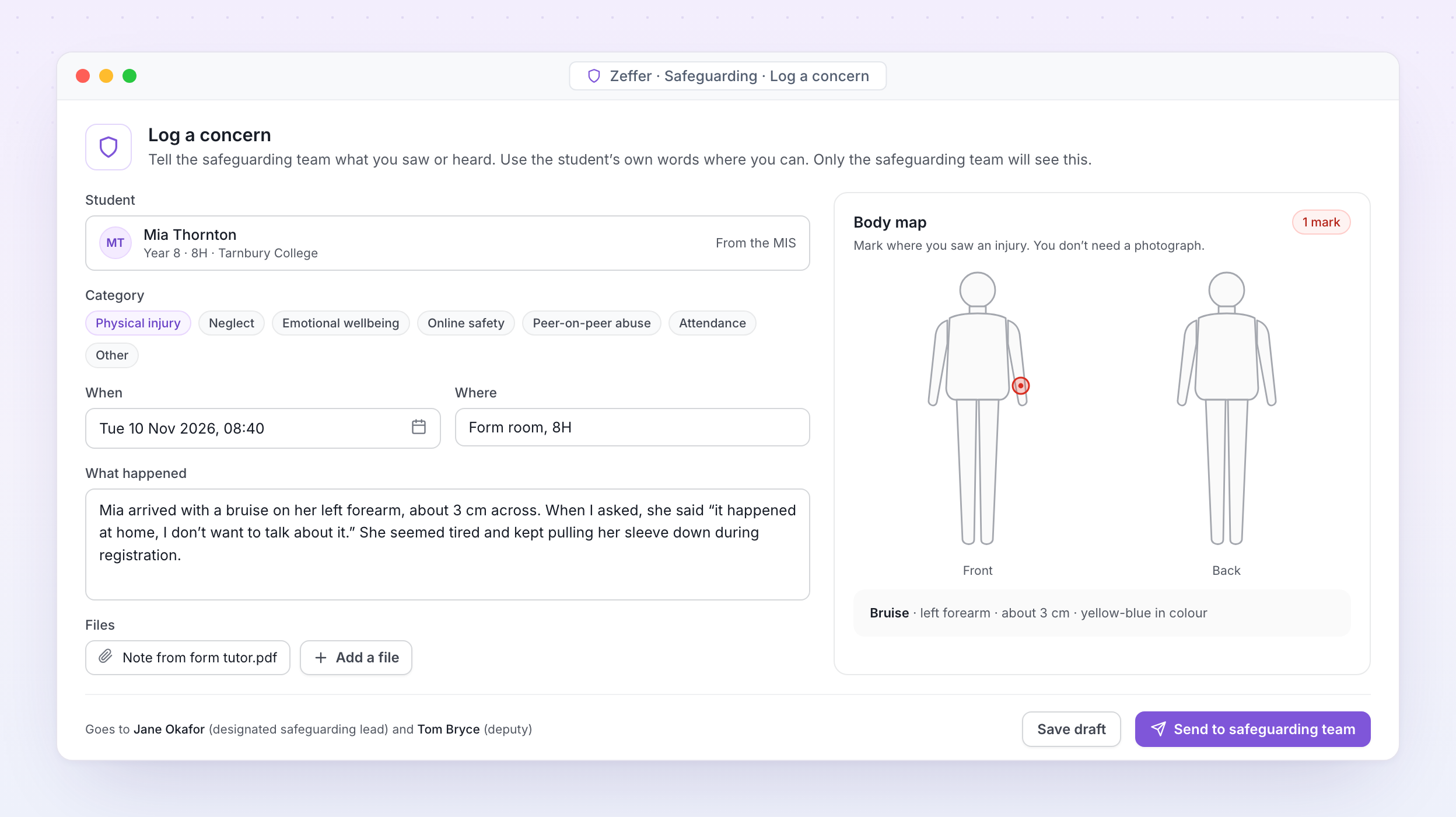
Logging a concern with a body map in Zeffer

Log a concern. A member of staff records what they saw, marks the injury on the body map and sends it to the safeguarding team, who are told straight away.

Quick concern form

Student, what happened, when, where and what was said. Student details fill in from your MIS.

Your categories and forms

Set your own concern categories, fields and forms for each school, or once for the whole group.

Body maps

Mark where an injury is, front or back, with its type and size. No photograph needed.

Files and evidence

Attach letters, emails, photos of written work and meeting notes. Everything stays inside Zeffer.

From school or from home

Concerns can be raised on any device, so nothing waits until the next morning.

Sensitive by design

Staff see only what they have recorded. Nothing about a concern appears on the student's wider record.


Support

Frequently asked questions

FAQs outlining how independent schools interact with our software and collaborate with our company.
Why should an independent school move away from Excel for budgeting and forecasting?
Excel is flexible, but it becomes risky and inefficient as budgets grow more complex. Dedicated systems reduce manual errors, provide audit trails, handle multi-year forecasting more reliably, and save significant staff time, especially for Bursars juggling multiple models and scenarios.
How does a budgeting system support governors and trustees?
Dedicated systems provide clear reports, dashboards, and audit trails that are easy for non-financial governors to understand. This improves governance, transparency, and confidence in the numbers presented at finance committee and board meetings.
What are the main risks of continuing to rely on Excel?
Common risks include version control issues, broken formulas, lack of transparency for governors, limited scenario modelling, and dependency on one or two staff members who “own” the spreadsheet. These risks increase as schools face tighter margins and more scrutiny.
What about scenario planning for student numbers and fee income?
This is one of the biggest advantages over Excel. Schools can quickly model different enrolment scenarios, bursary strategies, and fee changes, and immediately see the impact on cash flow, reserves, and long term sustainability.
Is it difficult to move from Excel to a budgeting system?
Implementation is very straightforward. Historical data can be imported, and the system is designed to feel familiar to Excel users while removing the pain points. Training is typically minimal as the system is designed to be familiar and intuitive.
Will a budgeting system work with the way independent schools are structured?
Yes. The system is designed specifically so that independent schools can handle departmental budgets, cost centres, boarding vs day operations, restricted funds, and capital projects. They are far better suited to school structures than generic spreadsheets.
Data integration - real time accounting data
Plans are per workspace, not per account. You can upgrade one workspace, and still have any number of free workspaces.
How does a forecasting system improve financial planning?
A forecasting system allows schools to model different scenarios, such as changes in student numbers, fee increases, tax law, staff costs, or pension contributions in real time. This supports better strategic decision making and more confident long-term planning.
How does a system help with cash flow and reserves planning?
Unlike static spreadsheets, forecasting systems link income, expenditure, and timing. This gives schools a clearer view of cash flow, helping bursars anticipate pinch points, manage reserves responsibly, and plan capital expenditure with confidence.
Is the cost of a budgeting system justified?
For most independent schools, the return on investment comes from time saved, reduced errors, better decision making, and improved financial resilience. When compared to the hidden cost of spreadsheet maintenance and risk, a system often pays for itself quickly.
Avatar photoAvatar photoAvatar photo

Start your free trial

Can’t find the answer you’re looking for? Please chat to our friendly team.