

School groups

Strategic financial leadership for school groups

Zeffer enables school groups to gain centralised visibility, streamline budgeting and forecasting, and manage finances across multiple schools for informed, strategic decision-making.
Reporting · Governance

Management accounts ready when the month closes

As soon as the month's trial balance arrives, the management accounts are ready: actuals to date, the forecast for the rest of the year and the budget beside them, for one school or the whole group.
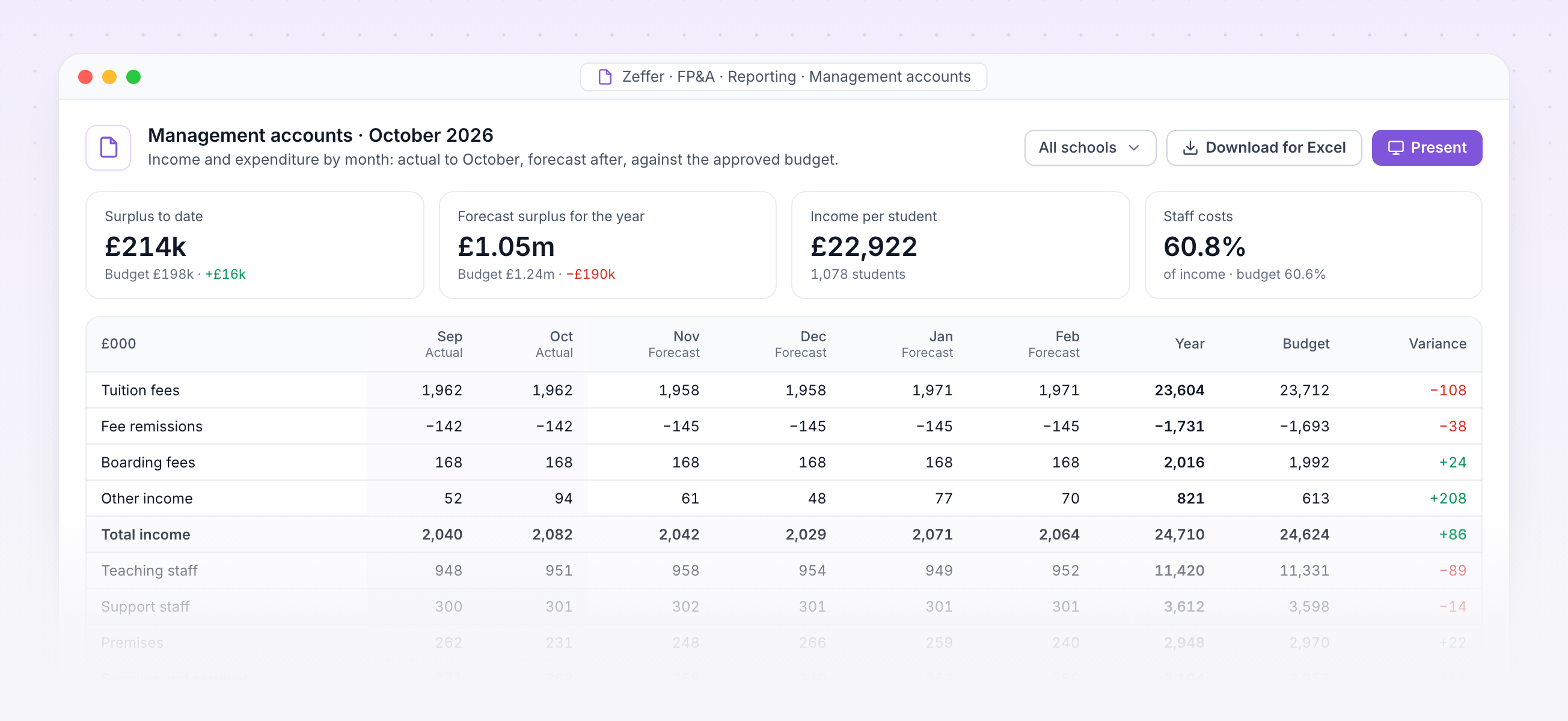
Arrange the lines, columns and periods your way, and add per-student figures.
Present full screen at the finance committee, or download for Excel exactly as shown.
Balance sheet and cashflow reports come from the same forecast.
Every figure traces back to a student, a member of staff or a pack line.
Management accounts with income and expenditure by month against the budget

Management accounts. October's income and expenditure by month, actual then forecast, against the approved budget.
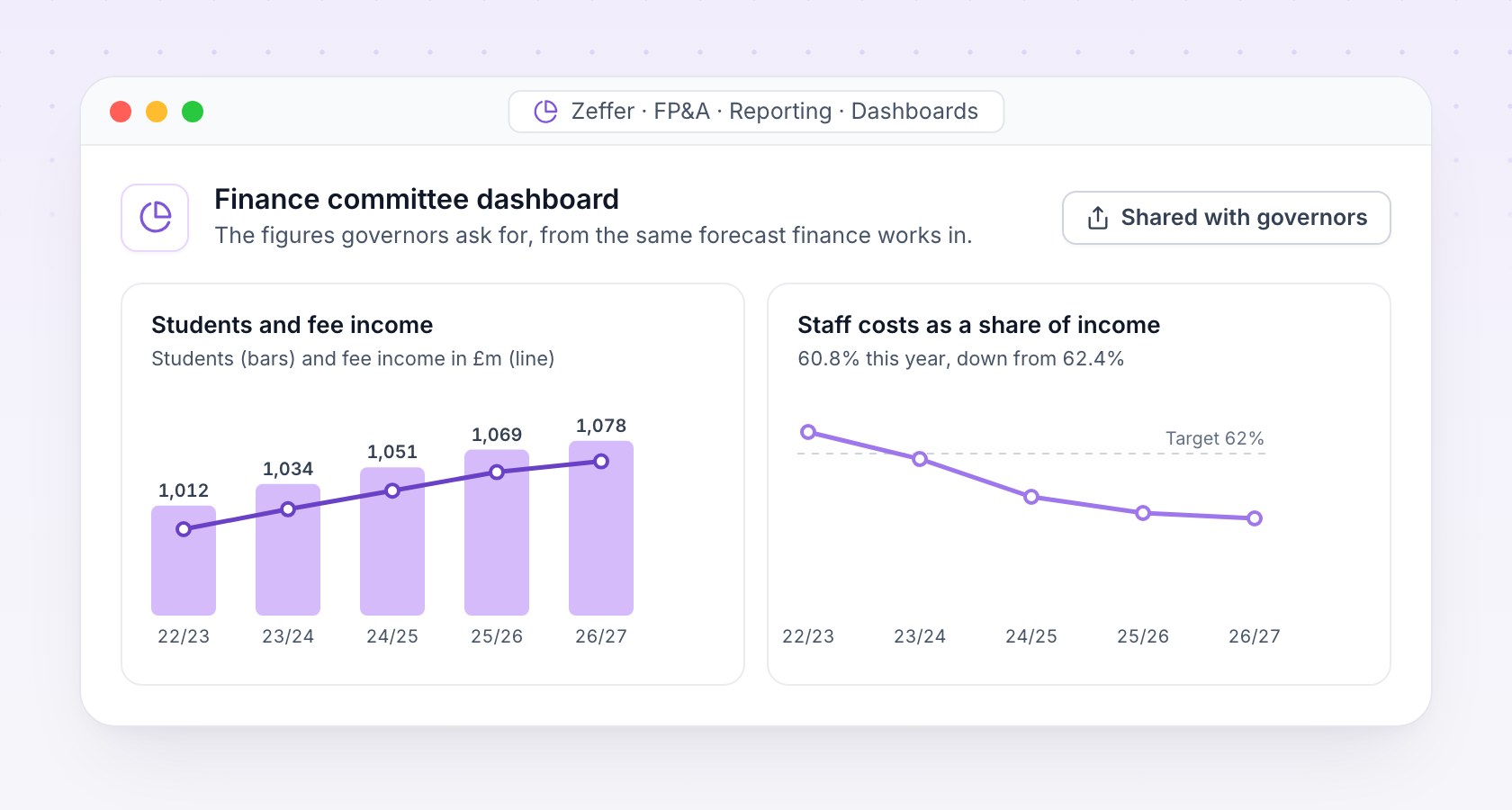
Finance committee dashboard with students, fee income and staff costs over five years
Dashboards

The figures governors ask for

Build dashboards for the finance committee and the board from the same forecast, and share them with exactly the people who should see them.

Students, fee income, staff costs and cash over time, by school or across the group.
Governors see the dashboards and plans shared with them, without access to the detail behind them.
Budget · Budget packs

A budget built by the people who spend it

Each department gets its own budget pack. Budget holders add what they expect to spend or receive, line by line, and submit it. Finance reviews, returns or approves each pack, and the forecast reads every figure the moment it is typed.
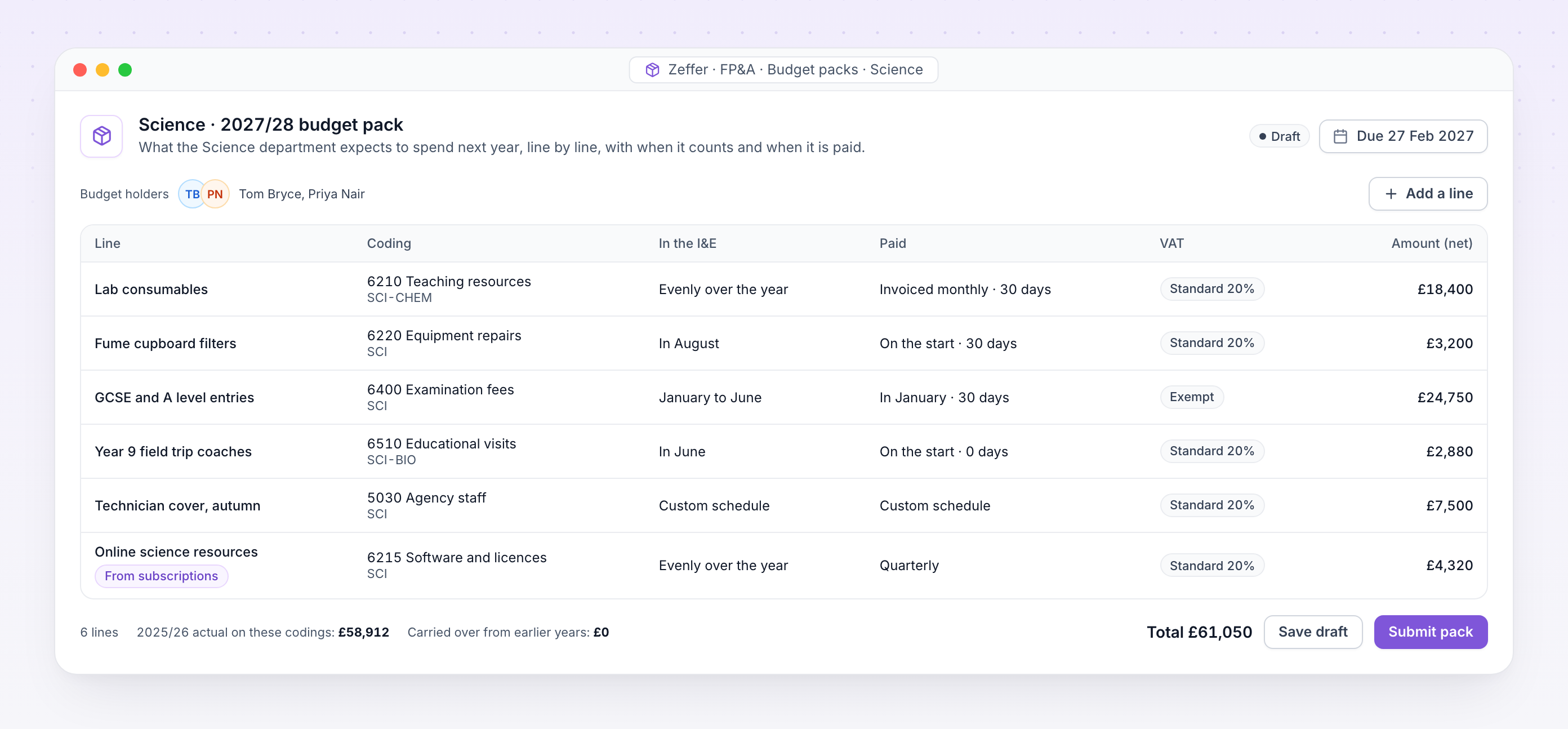
The Science department's budget pack for next year, with each line's coding, timing, VAT and amount

Budget pack. Science's lines for next year, each with its coding, when it counts in the I&E, when it is paid and its VAT.

Codings that match your books

Every line sits on a nominal and analysis code from your own chart, so the budget lands where the actuals will.

When it counts, when it is paid

A recognition profile says when a line reaches the I&E. A cash profile says when it is invoiced and paid.

VAT on the line

Lines are entered net of VAT with a VAT code. Zeffer works out the VAT and when it is settled.

Last year beside next year

Holders see what was spent on each coding last year while they plan the next.

Shared across schools

Charge a share of a line to other schools, and each receiving school sees it in its own pack.

A clear workflow

Draft, released, submitted, approved: finance sees where every pack stands, with one deadline for the year.
School-specific · People and posts

Staff roles that understand how schools work

Zeffer holds teaching, support, leadership, boarding and peripatetic posts in each school's departments, and lets one person hold more than one job. A post's role decides which checks its holder needs.

School structure

Posts by department, with a staff category, a budgeted headcount, and flags for work with children and for management.
Departments for each school, with optional accounting codes.
Term calendars and bank holidays for each school's region.
For a group, every screen can be viewed for one school or the whole group.

The right access for each role

Set access per role at None, View, Edit or Full for each area of HR.
Four separate keys to sensitive data: personal, pay, health and safeguarding, never granted automatically.
Nobody approves their own request. Leave, claims, pay changes and references always go to someone else.
Full history of who changed what and when, on every HR record.
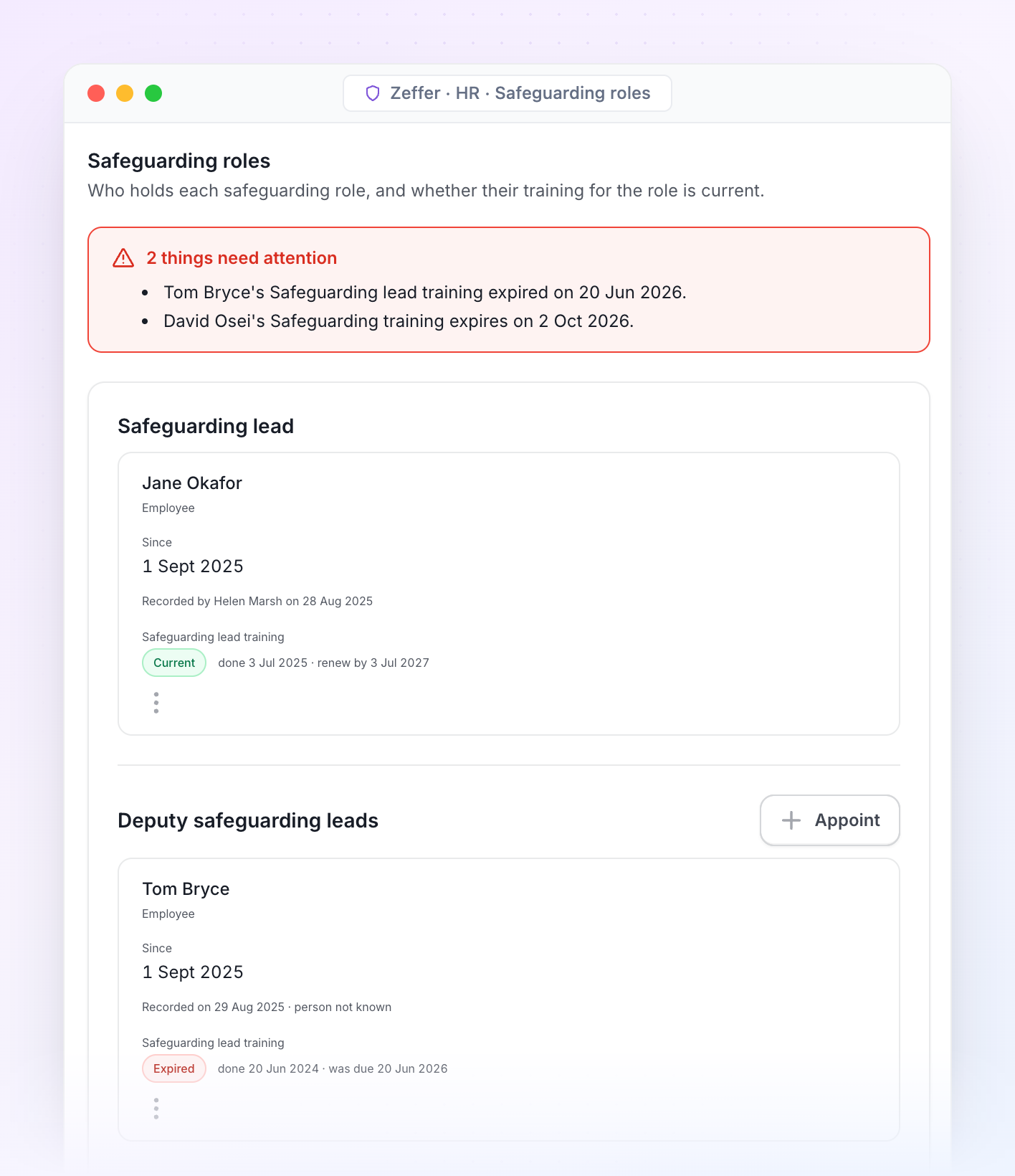
Safeguarding roles with training status for each holder
Safeguarding roles. Who holds the designated safeguarding lead, deputy and safeguarding governor roles in each school, and whether each holder's training is still current.
School-specific · Inspection and governance

Ready for inspection, governors and the trust

Reports come from the same records the safeguarding team works in, so the numbers always agree. Produce the termly governor report, an inspection summary or a trust-wide view in minutes.
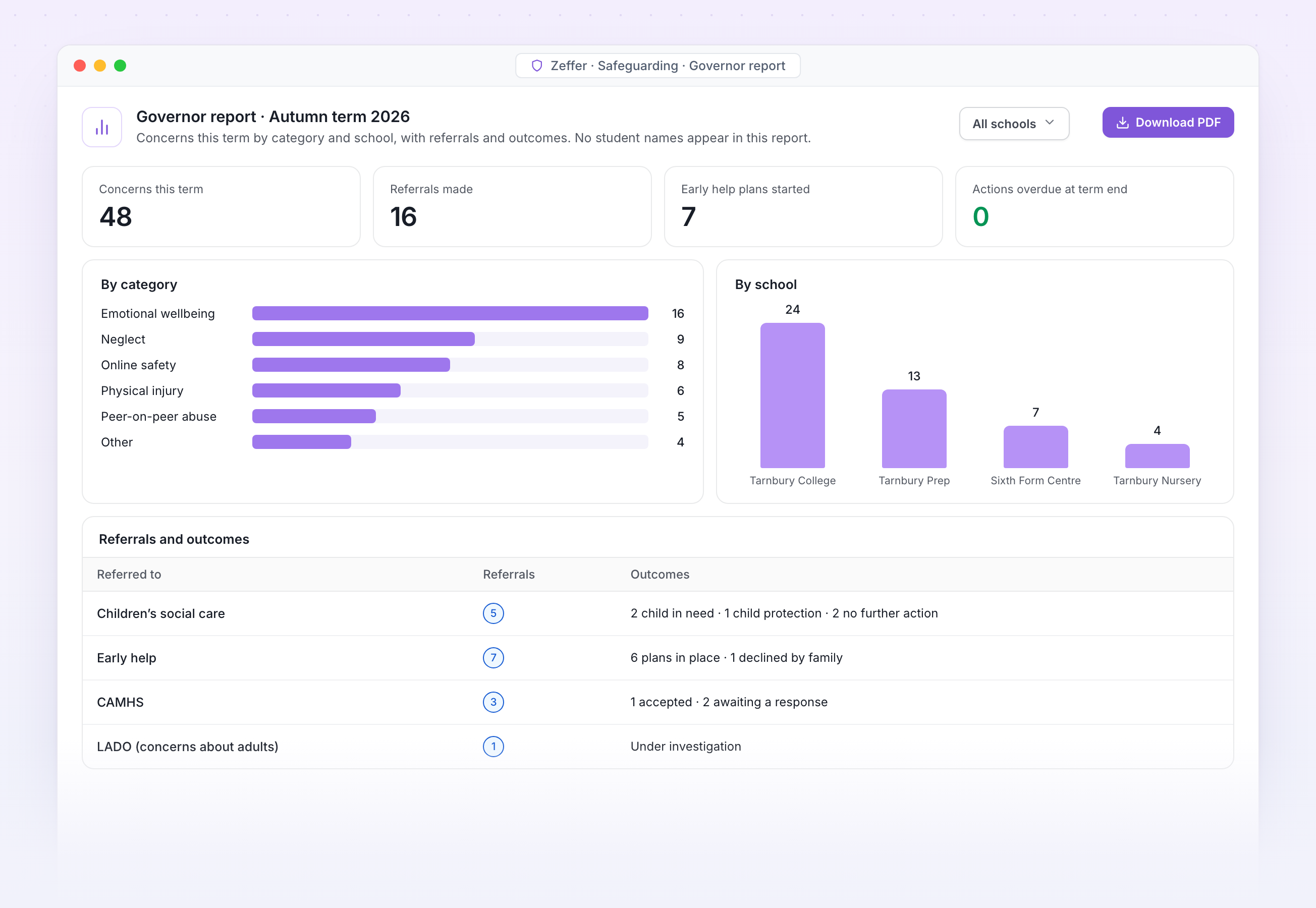
Termly governor report with concerns by category and school

Governor report. Concerns this term by category and school, with referrals and outcomes and no student names, ready for the safeguarding governor.

Trends over time

With filters for SEND, looked-after children and disadvantaged students.

Concerns by term
SEND filter on
AutSprSumAutSprSum
All students
SEND

Trust dashboards

Compare schools across the trust without showing individual students.

Open concerns by school
4 schools
Oakfield
42
Riverside
31
Hillcrest
24
St Anne's
18

Every download logged

Any report as a spreadsheet or PDF, with a record of who downloaded it.

Download log
Audited
JP
Governor report, autumn
J. Patel · DSL · 09:14
PDF
MO
Trends by year group
M. Okafor · Head · Yesterday
XLSX

Governor reports

Termly governor reports by category, year group, school and outcome.

Concerns by category
No student names
128
Neglect
34%
Emotional
26%
Online
18%
Other
22%

Inspection summary

An inspection summary for Ofsted, ISI or Estyn, as at any date.
Inspection summary
Ready
Concerns with outcomes
128
Referrals and responses
14
DSL training in date
100%
As at 11 Nov 2026 · Ofsted, ISI or Estyn
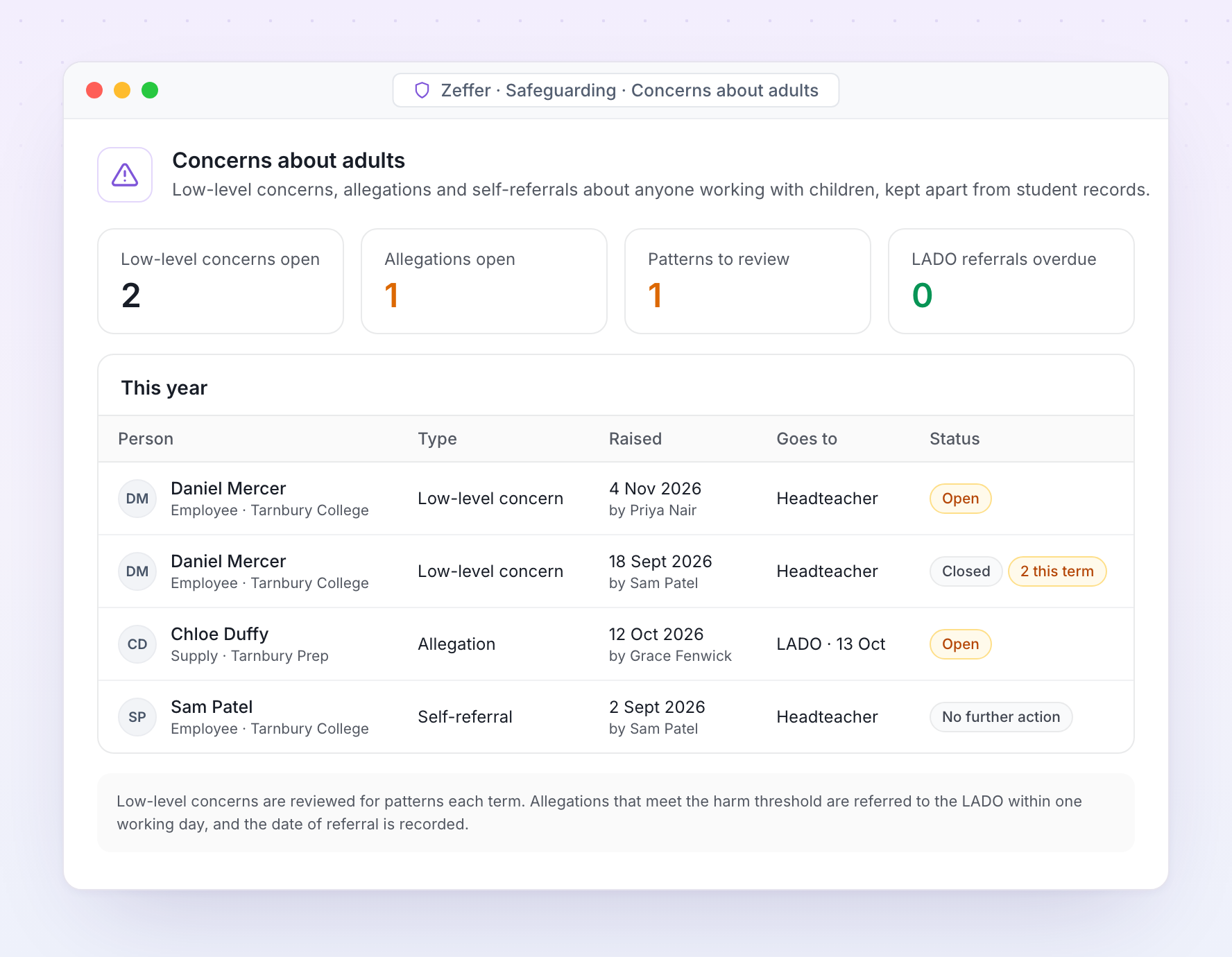
Register of low-level concerns and allegations about adults
Kept apart from student records

Staff allegations and low-level concerns

Concerns about adults are kept apart from student records, with their own access. Low-level concerns, allegations and self-referrals each follow the route KCSIE sets out.

Concerns about adults handled the way KCSIE expects
Low-level concerns are recorded and reviewed for patterns. Allegations that meet the harm threshold are referred to the LADO with the date recorded, and records are kept for as long as KCSIE requires.
Integrations

Headless design with API first development

Your data can be seamlessly connected to Zeffer and kept in sync to ensure accuracy. This eliminates double entry and reduces time spent on manual checks. Zeffer supports a wide range of applications, with new integrations added regularly.
Integration iconIntegration iconIntegration iconIntegration iconIntegration iconIntegration icon
Support

Frequently asked questions

FAQs outlining how school groups interact with our software and collaborate with Zeffer.
Why is multi-currency support important for international school groups?
International education groups often manage currency volatility, cross-border fee income, international staffing costs, and board reporting in a base currency. A forecasting platform enables teams to apply exchange-rate assumptions and model currency movements, helping leadership understand financial exposure and protect long-term sustainability.
Can the system handle multiple currencies?
Yes. Schools forecast in local currency (e.g. GBP, USD, EUR, AED), with automatic consolidation into a chosen reporting currency for group-level visibility. Exchange rates can be managed at either group or school level using custom or actual values.
Can we model different financial scenarios?
Yes. The platform allows teams to model and compare multiple scenarios, including student growth or decline, fee changes, staffing restructures, inflation shifts, exchange-rate movements, new campus openings, and regulatory or tax changes. Side-by-side comparisons support clearer strategic decision-making.
How does the system support staffing and enrolment planning?
Staffing and student numbers are the primary financial drivers in independent and international schools. The platform enables teams to model staffing structures and future changes, link enrolment projections directly to income forecasts, assess the long-term impact of staffing ratios, and test sustainability under different enrolment scenarios.
How does a forecasting system support governance and board reporting?
A forecasting platform strengthens financial oversight through standardised, professional reporting, clear documentation of assumptions, controlled user access, and full audit trails. Consolidated summaries for trustees, investors, and directors increase transparency and confidence at board level.
How does a forecasting system improve visibility across multiple schools?
The platform enables school-level forecasting with automatic group consolidation, transparent assumptions, and consistent board-level reporting. Multi-currency support makes it ideal for education groups operating across regions.
Why should our school group use a dedicated forecasting system?
A dedicated forecasting system provides structured, consistent financial modelling across multiple schools or campuses. It enables leadership teams to plan confidently, identify risks early, and make informed strategic decisions using reliable, consolidated data.
Is the system scalable as our group grows?
Yes. Whether your group is expanding within the UK or internationally, the platform supports additional schools or campuses, regional reporting layers, multi-currency consolidation, and growth modelling. It is designed to scale alongside your organisation.
How does a forecasting system reduce operational risk?
By centralising data and standardising forecasting methodology, the platform reduces reliance on individual knowledge, improves consistency across schools, minimises manual consolidation risk, and protects data through controlled access. This strengthens long-term organisational resilience.
What are the key benefits for UK independent and international school groups?
The platform delivers consolidated group visibility, multi-currency capability, clear scenario modelling, stronger governance, and improved strategic planning. It also enables early identification of financial risk, builds board-level confidence, and supports long-term financial sustainability.
Avatar photoAvatar photoAvatar photo

Start your free trial

Can’t find the answer you’re looking for? Please chat to our friendly team.